


Pinterest for Teachers: How to Grow Your Teaching Business
Can we use Pinterest for teachers? Yes, you are a content creator. You can sell more of your teacher resources and grow your teacher business using Pinterest. Today I’m going to show you exactly how you go about doing that.
Whether you’re a seasoned teacher and you’ve been selling and using Pinterest for years, and maybe you need a refresh, or you’re new and you have a new store… Whether you have an online shop on Teachers Pay Teachers, Etsy, your own web store, whatever it is—we’re going to chat about it today.
If you’re new here, my name is Heather Farris, and I have been running a Pinterest marketing agency and Pin Profit Academy for 9 years. In that time frame, I have helped quite a lot of teachers get established on Pinterest and grow their teacher businesses on the platform.
Key thing with Pinterest for teachers
First thing, I want you to go into this post understanding this: You don’t want to just stick up pins. You don’t want you to just stick up pins. I want you to think about the end point and the goal that you have in mind for your:
- products
- resources
- blog posts
- podcast episodes
- YouTube videos
- whatever content that you have
Consider that destination as the place that you are going to convert and gain customers or followers. If you feel like you are just pinning and you’re not actually sure about what you should be pinning (what the creative should look like, what your keyword or board strategy should be), this is going to help you to iron out all of those little details.
RELATED: Organic Pinterest Marketing for Teachers Pay Teachers
Defining your goals for using Pinterest for teachers
Welcome to marketing with Pinterest for teachers. If you are looking to strategically get more traffic and sales, this is what I see working for teacher sellers from my client base and students.
First of all, we want to start off by defining your goal for using Pinterest.
- Do you want to grow your traffic and sales to your stores?
- Do you want to grow traffic to your blog posts?
- Do you want to grow your email list?
- Are you looking to get more views or listeners for your YouTube channel or podcast?
- Or are you just looking to build authority or awareness in your niche?
All of the above are very honorable goals and they are achievable using Pinterest for teachers. If your goal is any one of these things, Pinterest is definitely a place for you.
The challenge for teacher sellers
A specific challenge for teacher sellers, that I have identified from working with them over the years, is balancing where to send your traffic. A lot of teacher sellers are selling first on Teachers Pay Teachers and that is their primary income source.
One of my previous clients actually had their own website, an Etsy store, and a Teachers Pay Teachers store and sold across all three places very well. We only used Pinterest for her to sell her website products because we wanted all of the traffic to be owned.
This is a challenge for you as you define your Pinterest strategy and lay it out.
- Where are you going to send your traffic?
- Are you going to split sending your traffic to multiple platforms?
- Or are you going to focus on one platform?
- What does that look like for you?
You might also have long form content from a blog or channel, as well as products that you sell on your own website or store.
What to determine for your traffic flow with Pinterest for teachers
From the perspective of using Pinterest for teachers, I would encourage you to actually send traffic to all of the places where you are doing your sales. Because you never know when a teacher is going to find your TPT link, see all the reviews in your store, and then convert.
What you need to determine:
- Where do you want your primary traffic source and sales source to go?
- What are the URLs that are going to follow?
These internal all-in-one sales platforms have benefits over self-hosting your own web stores, and those built-in sales systems are definitely one of them. The reviews that back those up are definitely advantageous to say the least.
After you have long term data (see the analytics section below), then you can adjust to focus on your primary traffic source, highest sales area, or tweak what’s not working to optimize better.
RELATED: Pinterest Analytics: What to Do With Your Pinterest Data
Step #1: Develop your keyword plan
I want you to start your keyword plan by really diving into what your core pillars are in your business. Your core pillars are the content topics or primary areas of focus you create for.
For example, my main pillars in my business as a Pinterest marketing educator are:
- Organic Pinterest marketing
- Paid Pinterest marketing
- Graphic design for Pinterest
- Automation for Pinterest (scheduling)
I would write those down on a piece of paper or put in a spreadsheet, and then underneath those you are going to put down the things that go with that pillar. Anything that you’ve created or intend to create: content, products, funnels already in place.
This is actually going to spiderweb out into your keyword plan. If you can start with your really broad pillars then build on those, this will help you jump start your progress.
You do not need paid keyword research tools. Use:
- The Pinterest search bar (because it’s a search engine different than Google)
- The Pinterest Trends tool
- The Pinterest Ads Manager

These are solid for finding Pinterest keywords and determining your boards, descriptions, and keyword usage.
RELATED: Pinterest Trends: How to Use This Keyword Tool for Content Planning
Where to apply your keywords
Use the same keywords that your buyers are using in your Pinterest strategy. Keywords everywhere in your profile:
- Display name
- Pinterest bio
- Board titles
- Board covers
- Board descriptions
- Pin titles
- All text overlay
- Every pin description
Those are all places that you can use keywords on Pinterest to be indexed and found by your ideal viewer or customer. Once you have your keyword plan in place you can move on to your board strategy.
RELATED: 6 Places to Use Keywords to Optimize Your Pinterest Profile
Step #2: Building your board strategy
Your board strategy is one of the most important things with Pinterest for teachers, aside from your keyword strategy. Keyword strategy is number one, but your board strategy determines how your content gets indexed properly and found in the long run.
Base your boards off the pillars we just talked about, and then go wide. For example, the main pillar might be “Fifth Grade Lessons and Resources”. Then you can have topic boards that come off of this, like:
- Fifth Grade Reading Lessons
- Fifth Grade Math Resources
- Fifth Grade Science Lessons
- Fifth Grade Social Studies Activities
- Fifth Grade English Resources
- Fifth Grade PE Activities
You could also add supplementary boards like “Substitute Teacher Lesson Plans”, “Classroom Management Strategies”, “Classroom Décor”, or “Classroom Library Resources”, etc.
These boards house the Pinterest pins or content that you link to, supporting the overall topics you create products for, and sell.
RELATED: The Ultimate Guide to Create Your Pinterest Board Strategy
Step #3: What content you should promote
Teachers have so many different links, you likely have long form content, products across multiple stores, plus email opt-ins. Each week your pins should be a mix of:
- Long form content (blogs, YouTube videos, podcasts)
- Product listings (TPT, Etsy, web shop)
- Free resources (downloads, opt-ins, funnels)
- Repurposed content (Instagram reels, etc)
Start with your most profitable sales channel, and then add in your website if it’s not already your primary source.
RELATED: My Simple Content Strategy For Digital Products
Step #4: Creative strategy for your pins
Your creative strategy flows from your keyword plan and the Pinterest trends you’ve already researched or created.
Create image and video pins for both free and paid content. Use Canva templates sized for Pinterest (1080×1920) and make covers for your videos when needed.
Older creators, in the early Pinterest world,often made one pin per blog post, or piece of content, and repinned it across many boards. Instead, you need to create multiple pins for each blog or product for a single board.
For example, if you have a “5th Grade Science Curriculum” blog post, create multiple different images:
- A general pin for the post
- Specific pins for physics, earth science, weather, etc. (subtopics discussed within the blog post)
- A call-to-action pin showing your free download or resource from the post
RELATED: How to Create Branded Pinterest Designs to Boost Sales
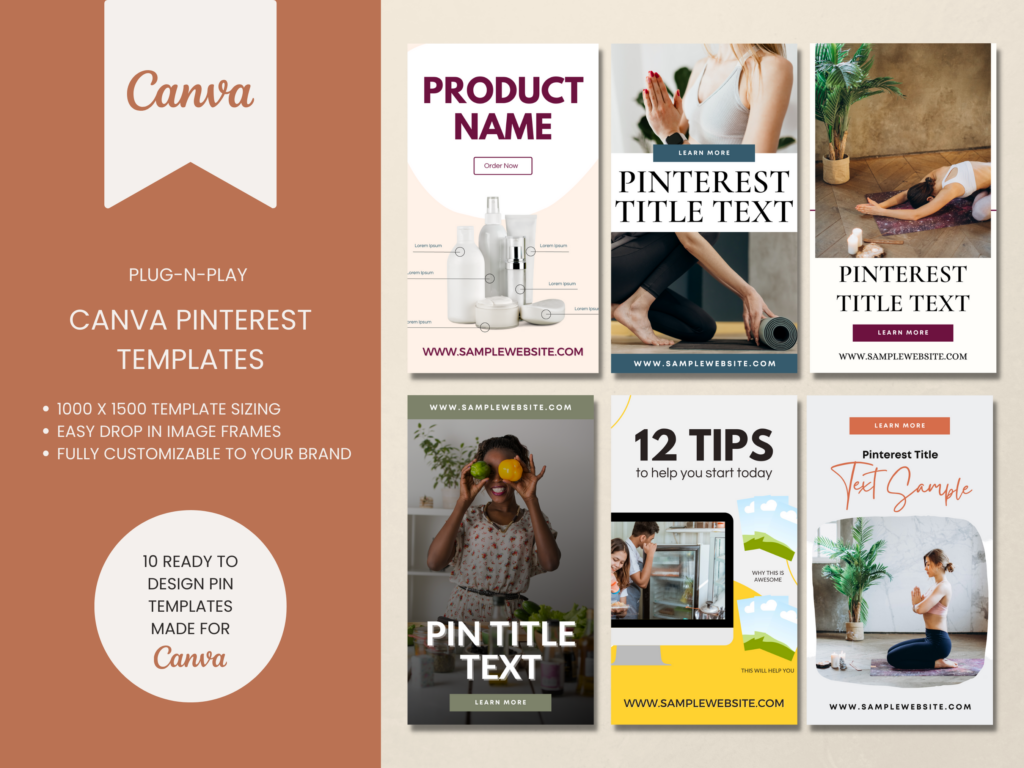
Video or Content Pinterest Templates
If you want traffic don’t rely on something just whipped up! Speed up your pin creation by using templates to get more pins out faster and more often.
These Pinterest templates are great for video content or blog posts & are ready to go. You can start creating pins on Pinterest in minutes.
Step #5: Scheduling your pins strategically
Don’t publish your pins multiple times to different boards. Instead, all of the pins you’ve made will go on separate boards or board sections.
Space out your scheduling. Don’t pin all your pins for the same URL in the same 24 hours. Spread them across 6–8 weeks. Use Pinterest’s free scheduler or tools like Tailwind or Buffer.
RELATED: I Tested Pinterest Approved Schedulers So You Don’t Have To
Key reminders and tips with Pinterest for teachers
Here are a few things moving forward to keep in mind that will keep your Pinterest for teachers strategy working well.
Prioritize Pinterest trends and seasonality
Start pinning 90 days ahead with seasonal content. If you have resources or lessons having to do with holidays or only certain times of the year, always pin those 3-4 months ahead. That’s the optimal time for the algorithm to utilize your pins.
- Back to school activities
- Autumn outdoor science lessons
- Winter holiday worksheets
- Valentine’s Day math resources
- Springtime spelling lists
- Summer break study packets
RELATED: The Ultimate Guide to Create and Sell Digital Products
Daily pinning mix rotation
Remember to schedule out things in advance so you have a variety of pins and links being published in a rotational fashion with your products, funnel pages, email opt-ins, free blog content, etc.
Minimum of 3 pins per day is recommended, but even 1 is better than none. Just don’t pin everything all at once and then not again for weeks. Always space out pins linking to the same URL. Don’t sandwich them together back to back. Mix in other URLs and content types to cast a wider net.
Use your favorite Pinterest scheduler—Tailwind, Later, or Pinterest itself—to stay ahead. Create pins in Canva, schedule them, and move on to the next URLs.
RELATED: How Often Can You Pin the Same URL to Pinterest Without Being Spammy?
Analytics to track
This is a big topic, and I’ve linked below a full post on what to know about your analytics. But for summary, focus on:
- Impressions
- Saves
- Outbound clicks
- Engagement rate
Also pay attention to top boards and top pins, since after 6 months Pinterest deprecates the data. You’re going to want all this data later in order to grow.
RELATED: Pinterest Analytics: What to Do With Your Pinterest Data
Final thoughts on Pinterest for teachers
To continue your Pinterest for teachers journey and develop your complete Pinterest marketing strategy, you can check out my YouTube channel, or join us inside Pin Profit Academy for hands-on learning. If you’d like to learn more about how to get your business—specifically your teaching resources, your teacher blog, or your teacher shop—in front of your ideal audience, join us in Pin Profit Academy.
See you again soon, for you’ll be a great Pinterest marketer!

Pin Profit Academy
Marketing can be difficult and trying to figure it out on your own, especially with Pinterest, can be overwhelming.
I will show you how to double your traffic and sales without spending another minute on social media!
PPA is the only comprehensive membership program & community for creating, marketing & selling your products & services using Pinterest.
Pin it for later


Heather Farris went to school for accounting and worked for years in banking and finance. After finding all of that entirely too boring she started her first blog in her basement in August of 2016. She has started 3 blogs in the marketing, motherhood and travel niches and used Pinterest to grow them all. She quickly became the go-to Pinterest strategist in her peer circles and has been implementing strategies, driving traffic and sales through organic and paid tactics for her clients. On this blog and her YouTube channel, as a renowned Pinterest marketing expert, she educates the public about clear and transparent marketing strategies to help them to grow on Pinterest and in other places online. She created Pin Profit Academy and helps small business owners just like you to master their Pinterest marketing strategy. Heather is now a Pinterest Educator, one of the very few sponsored by Pinterest.









