Easy Content Repurposing Using ChatGPT
Using AI tools for content repurposing is a fantastic way to make your content spread across your marketing for weeks. A lot of people work with ChatGPT, Claude or other AI tools to create content for their businesses. But I don’t want to end up with mediocre content that sounds like everyone else, and I don’t want AI sounding content inside my business.
I don’t use them to create my content, but I do use them to repurpose the content, and for other workflow things inside of my business. They do tremendous work this way and make what I create go really far, while keeping everything unique to me. So I’m going to show you how I do this today.
Content repurposing is a must for business
There is a better system to take your long-form content, that you worked so hard on, and repurpose it, and make it weeks worth of marketing for yourself. You’ve got to get smart and work with the tools. The only way to grow is to exponentially use one thing you’ve created.
I don’t restart from scratch every single time. In fact, I’ve created a chat bot that is trained on a lot of this. That’s what I’m going to show you today and how you can do this as well.

The Pin Bot for ChatGPT — Your Pinterest Marketing Sidekick
Stop spending hours writing pin descriptions, SEO blogs, or brainstorming your Pinterest strategy.
The Pin Bot for ChatGPT is your ready-to-use Pinterest marketing assistant, pre-loaded with proven templates so you can create, plan, and optimize content in minutes.
Now, I did create a resource for you on this content repurposing system that you can download from the free resource library on my website, and you can get access to this, and it has detailed instructions on it, even further than what we’ll do here.
Now, this blog is not going to be detailing how you can build one big long magical prompt that’s going to do everything that you ask for as soon as you hit enter. No, this is about building a system around a workflow, in order to make your content go further and last longer.
RELATED: Content Repurposing: 2200% Increase in Views in 90 Days (Repurpose.io Review)
Why repeated long prompts aren’t the best
A few problems that I see with students inside of my academy is that they use long prompts every single time. They just kind of paste it all in there, repeat it over and over and let the chat do its thing.
That’s not necessarily bad, and you can definitely work things that way. When I started using AI chats, I definitely did a lot of that. But with the evolution of chats, adding project files and custom GPTs, things have definitely gotten better.
Why I use ChatGPT for my content repurposing
Now, that’s for sure with ChatGPT, and I’m still using ChatGPT. That is the tool that I have built my custom bots inside, and I’m not really looking to move it at this time. However, the thing that I like is that these project files can be trained and formatted to do certain things.
- They can support the style and formatting of the output that you want.
- They can follow the rules that you have set.
- They can understand what you do in your business, how you help people.
- They know your audience and who it is that you help.
- What the tone is of the project, or the writing style, or the offer you’re creating.
But if you have to explain that every single time from scratch, you’re probably not getting the outputs that you want, because models vary and updates change regularly.
So, I’m going to show you how to do it a different way today. Then I’m going to give you the system starters so you can actually go build this inside of your own chat today. And if you want to take this and use it elsewhere in other AI tools, I’m sure you can do that as well.
RELATED: Make the Most Pinterest with The Pin Bot for ChatGPT (A Pinterest AI ChatBot)
The three layered system for content repurposing
You don’t need to start with one giant prompt every single time. You need a system that has layers. I’m going to show you my three-ish part system that I use for my content repurposing.
- Layer one is project instructions and sources.
- Layer two is the starter prompt.
- Layer three are the follow-ups.
Let’s talk about what goes into your project instructions, and I’ll show you what this looks like inside ChatGPT.
Layer one project instructions and sources
The project files, these are the sources that you upload that ChatGPT is going to reference directly, like a mini library just for the project. Inside of your project instructions, it should fully outline what the custom GPT project should do for you.
This is the guidance that’s going to guide the entire project throughout the entire course of you using it. Your project instructions hold the baseline rules that you have that should apply every single time you use it.
Inside of my custom instructions, I have things like:
- Writing tone preferences
- Specifics on how I write
- Words to avoid
- How I want content formatted
- What this specific project’s goal is
Specifically, in mine, its instructions are that of a Pinterest marketing and content strategist.
Pin bot project instructions example
For me, I have a really long ‘About my business’ worksheet as part of my instructions. That worksheet includes:
- My offer details and pricing
- My audience details, demographics of who I help
- How I help them and what their outcomes should be
- A list of content that it can reference, like previous sales emails and landing page copy
- More free and paid offers, with links to those pages included
- My brand voice and tone
- A list of ongoing keywords I want referenced
Your project sources can go kind of long. There’s a lot of things that you can add there. But the more the better because it can only refine and help deliver exactly what you want for outputs with your repurposed content. Or any task you want it to do.
RELATED: 3 Types of Pinterest Content For Your Marketing Strategy
Layer two fresh chat start prompt
Now after your project instructions are sourced and uploaded, the fresh chat is what you start with each time you work on content repurposing. Or even when you’re creating new content for your business, or content ideas.
This is where things get multiplied. The fresh starter prompts (I’m going to give you this later on too), that goes in there every single time. It’s going to go in there with a bit of context, but you’re not re-explaining anything that’s already in your source files.
I’m giving it the assignment for the day. What I want specifically created, from or supported with the source material.
RELATED: 5 ChatGPT Prompts For Content Marketing That I Use Every Month
Layer three follow-up prompts
Now, the follow-up prompts are layer three, and that’s where this conversation expands or continues into more details or further options. That’s really where you begin directing traffic.
Maybe you want to start with creating an email from a YouTube video, and then you want to follow that up with different angles for social media posts, reels, tweets, threads, whatever. Some examples of follow-up prompts are like:
- give me a new angle on this or that
- rewrite that output with more emphasis on x, w, z
- give me a stronger hook to “fill in the blank”
- I don’t like the way that this is phrased, phrase it like this…
You can actually upload examples in the moment if you want it to go in a certain different direction, or you want it to expand or compound on something. The follow-up prompts really help you to work out the kinks.
Using the content repurposing prompt system template
Inside of my free resource library, I have the Content Repurposing Prompt System with templates for this entire process. I’ll use that as my example as we walk through how to do this together.
So if you’re starting with ChatGPT right now just for content repurposing, you can use all the prompts I’ve already written for you to start. Then you can tweak them as you like, or build off of them.
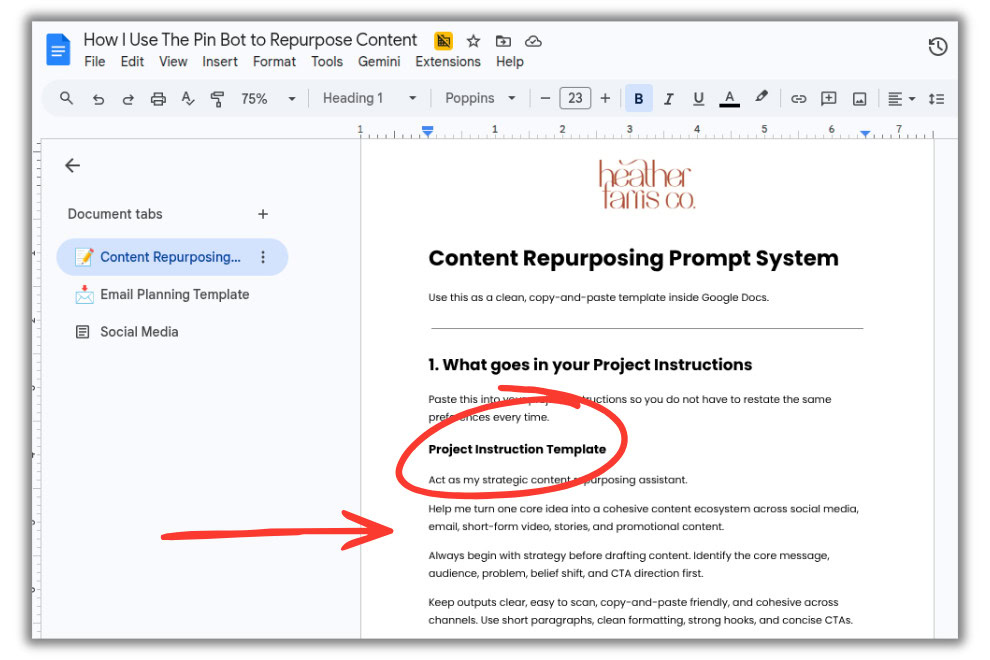
Right at the top you’ll see the ‘Project Instruction Template’ example. This is specifically for a project designed for content repurposing. In the next blog post section below, I show you where to paste this into ChatGPT. You can copy the exact text there, or adjust as you like.
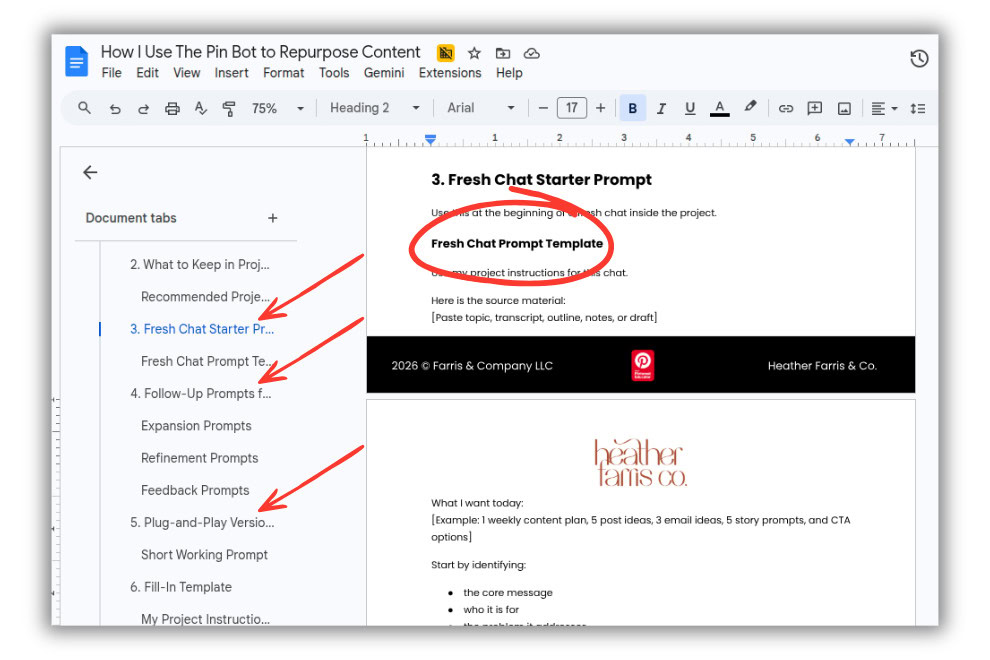
Then if you scroll down a little in the Prompt System file, you’ll see a bunch of prompt templates for starting fresh, following up with the output results, and refining everything based on the content you’re creating. You’ll see where you can insert your specific details for each, and full lists of suggestions for how you can play with each of these as you like.
RELATED: How to Write a Blog Post Outline With ChatGPT and Keywords Everywhere
Setting up your ChatGPT before content repurposing
When you have your project instructions and all the source files created or ready to upload, here is where they go inside of your ChatGPT.
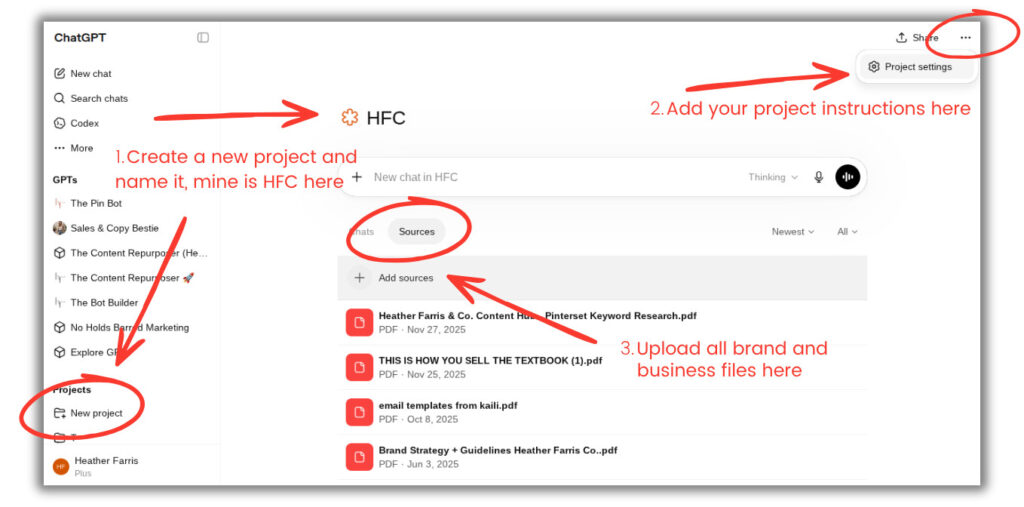
- Create a new project and name it.
- Click the three dots in the upper right corner, and enter your setting to insert your project instructions.
- Go to the ‘Sources’ tab to upload all of your reference documents and business files.
You don’t have to have the paid version of ChatGPT in order to do everything I’m covering today. But you may have limitations on the number of source files you can upload, as well as how long the chats go before you have to wait to continue, or just start a new one. So keep that in mind.
Building and using the chat prompts
Alright, let’s walk through an example with the start prompt. Right in a new chat in your project:
- Paste in the starter prompt from my Prompt System guide I’ve been referencing.
- Add the ‘source material’ just for this chat (your specific content you want repurposed, the topic, outline, notes etc.).
- Specify the output you want from the repurposing of your content (social posts copy, reel captions, tweets, etc.).
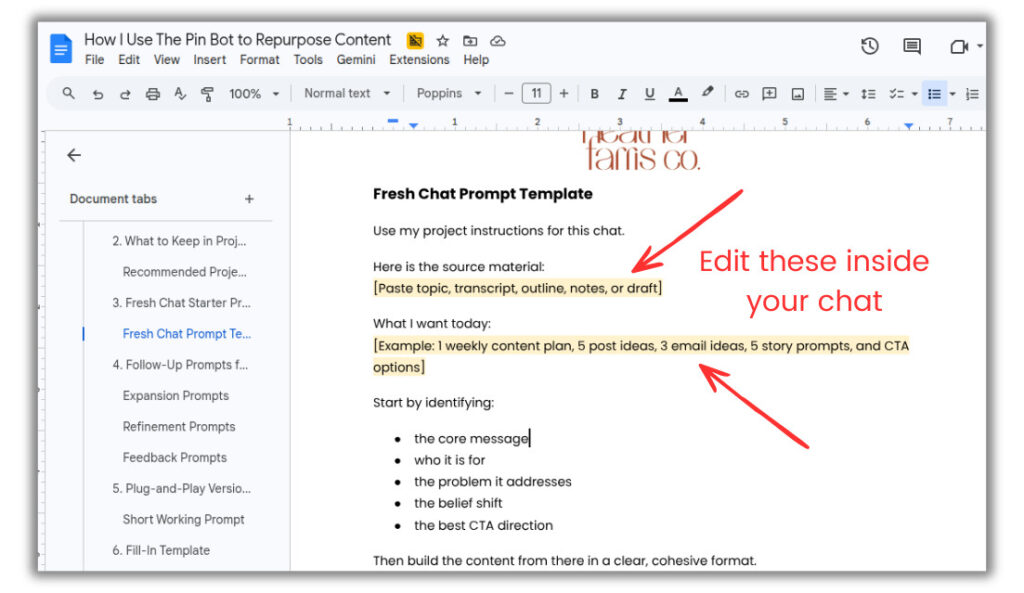
For my actual example, I pasted in the exact outline of my YouTube video from several weeks ago. And then I said what I want from it today is:
- Series of emails (educational, YouTube published alert, and sales)
- Social media posts
I was vague on just saying social media posts because I’m going to show you how to get more specific and detailed with the output from follow up posts.
RELATED: How to Use Pinterest to Grow Your Email List (The Ultimate Guide)
Renaming your chats for easier use
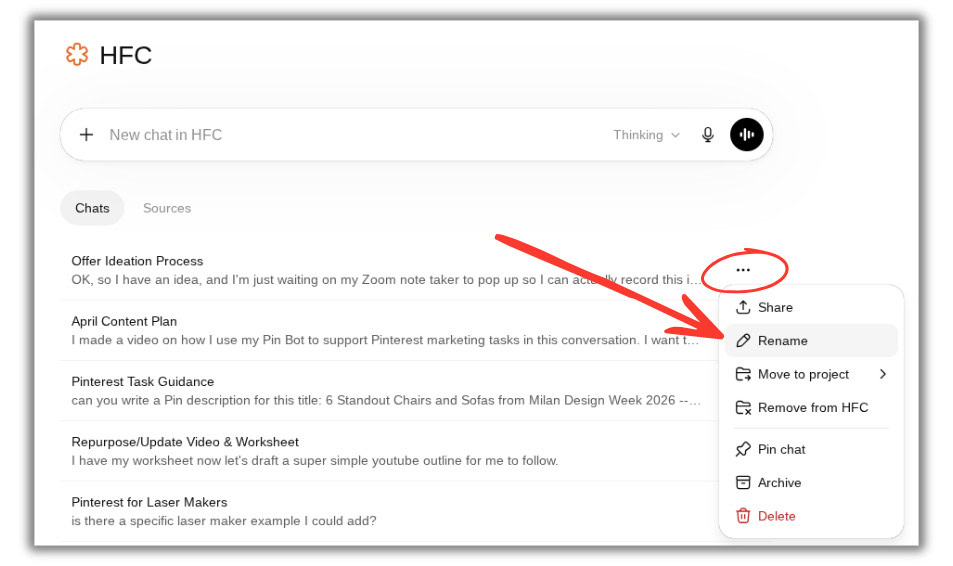
A key piece of advice here I’m going to give you is to rename your chats, and don’t let the standard name that ChatGPT gives it stay there. Because if you want to reference this later, you want to be able to find it. GPT names chats very generically, or based off of the first sentence you type, which doesn’t help at all.
So to do that you have to back out of the specific chat you’re in, at the Project level, and click the three dots on the right. Then you can rename the chat to something more memorable.
Using follow up prompts for detailed content repurposing
I wanted to show you what the bot will do and how you can follow it up from an output. I didn’t tell it that I wanted certain specific social media platform content. I just said ‘social media posts’. That’s very vague.
Now, this is where my bot knows me because of all the details I pre-loaded into the sources and project instructions. It knows I like to post on Threads and Instagram, so it gave me:
- 5 Threads posts, some with space for links
- Instagram carousel outline
- Captions and call to actions
- Hook and speaking points for reels
If you’re not specific, then chat’s going to give you some random stuff and you’re going to have to follow that up and fix it anyway. But it’s likely that you refine the results at least a few times. Your followup prompts can be more simple, calling out a specific output, or asking for a re-do with a slight detail change.
Inside of my Content Repurposing Prompt System within my free resource library, I have some ideas and suggestions for follow ups.
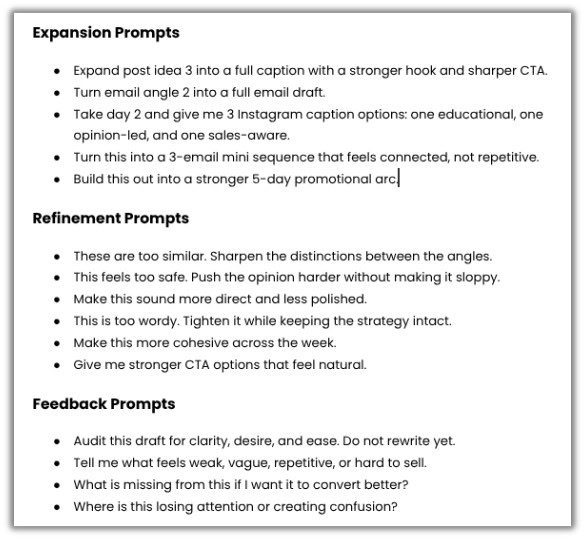
If you don’t like the wording, the angle, the take, whatever… you can use the follow-up prompts to change things, nothing is final until you say so. You can use those follow-up prompts for refinement, for feedback, for strategy expansion, content expansion if you want to go that route as well.
RELATED: 7 Things Missing in Your Pinterest Content Strategy
Making content repurposing consistent and strategic
The main takeaway here is to work smarter, not harder. You don’t want to start this complex conversation every single time you log in to ChatGPT. You want it to be a system that runs smoothly and consistent, adding to your marketing strategy and not just taking up more time.
I keep the project instructions as evergreen as possible. I keep the context uploaded to the project files. That way I can reference that on the go and keep those project files up to date. If anything changes about my business, if I add new keywords, sales offers, if I’ve written new copy, I upload that to my project files. About every month or at least once a quarter when I re-evaluate or shift, this gets done.
Then every single time I create content for a YouTube video, I pull out my prompts, my bot, and I get to work. I hope this system can help you to refine your systems, make it a workflow, build it into your system, and make this whole process easier on yourself.
RELATED: 4 Steps For Creating an Effective Pinterest Workflow That Produces Results
Final thoughts on easy content repurposing
Content repurposing gives small business owners a powerful way to do more with the content you already have. Instead of constantly starting from scratch, you can build greater consistency, expand your visibility, and create more opportunities for your message to be seen across platforms without excess work.
When you use this content repurposing method you gain more efficiency and momentum. You maximize the value of every piece of content, and make it easier to stay active in your marketing without burning out.
If you’re ready to put these ideas into action with a complete system and the knowledge base to support a successful Pinterest marketing plan, Pin Profit Academy is the next logical step for your small business. We’d love to see you inside our community and support you as you grow!

Pin Profit Academy
Marketing can be difficult and trying to figure it out on your own, especially with Pinterest, can be overwhelming.
I will show you how to double your traffic and sales without spending another minute on social media!
PPA is the only comprehensive membership program & community for creating, marketing & selling your products & services using Pinterest.
Pin it for later


Heather Farris went to school for accounting and worked for years in banking and finance. After finding all of that entirely too boring she started her first blog in her basement in August of 2016. She has started 3 blogs in the marketing, motherhood and travel niches and used Pinterest to grow them all. She quickly became the go-to Pinterest strategist in her peer circles and has been implementing strategies, driving traffic and sales through organic and paid tactics for her clients. On this blog and her YouTube channel, as a renowned Pinterest marketing expert, she educates the public about clear and transparent marketing strategies to help them to grow on Pinterest and in other places online. She created Pin Profit Academy and helps small business owners just like you to master their Pinterest marketing strategy. Heather is now a Pinterest Educator, one of the very few sponsored by Pinterest.