Pin Bot: The Custom ChatGPT for Pinterest
It’s time consuming to take the same piece of content and generate 10 totally different pin titles, with the different angles, using different keywords, separate descriptions, all on your own. So I built the Pin Bot, a custom ChatGPT for Pinterest.
This is what I use to speed along my own Pinterest marketing strategy, for both myself and that of my clients and my students. I love using this tool for these very specific purposes because it can help you to really save a ton of mental energy, let alone time.
And if consistency is an issue for you, then this is definitely going to help with that. There are five different very specific use examples I’m going to show you today for this specific tool. I probably use these every single week, if not every single day.
What is the Pin Bot
The Pin Bot is a custom ChatGPT AI tool for Pinterest that I built. I originally had someone else built it, but then I ripped it apart about a year later and rewrote everything. Then just this year I gave it another facelift. It designed for things like:
- Pinterest workflows
- Pinterest strategy
- Consulting guidance as if it were me
- Writing copy
- Analyzing systems
- Creating processes
- Brainstorming ideas
- Keyword research and optimization
- Auditing your Pinterest profile
It’s so powerful. It is especially useful for people who use Pinterest for their business, but might get stuck from time to time on what to create and how to post optimally. How to take the same content and apply multiple sets of keywords and pin angles to cover your full audience with pins.
RELATED: Make the Most Pinterest with The Pin Bot for ChatGPT (A Pinterest AI ChatBot)
Using AI without replacing your brain
Now, these are tasks that I think anyone can do even without AI, but the tool itself is definitely useful in helping you get outside of your own brain. Saving massive time, and generating things much faster than you can yourself. You still need to review outputs and use your brain, and I know all of the reasons why someone should not use AI.
This is a tool that I still use to help me to be better at the things that I’m already good at, optimizing what I already need to do anyway. But not letting it run everything that gets created, you still have final control over what goes in and what you use that comes out.
RELATED: Pinterest AI Settings to Update Immediately

The Pin Bot for ChatGPT — Your Pinterest Marketing Sidekick
Stop spending hours writing pin descriptions, SEO blogs, or brainstorming your Pinterest strategy.
The Pin Bot for ChatGPT is your ready-to-use Pinterest marketing assistant, pre-loaded with proven templates so you can create, plan, and optimize content in minutes.
Setting up the custom ChatGPT for Pinterest
I’m going to show you some examples of how this works and what you can do with it. I’ve set up a couple of things for us to work on that are likely what you do in your business. I normally use this bot inside of my custom projects folder, not just a single chat. But you can use the Pin Bot inside any stand alone chat, and I’ll show you how.
As a side note, I do recommend you set up a custom project folder that has source files for reference. My custom HFC project folder has all of the training inside of it that the bot needs in order to give me the best outcome for your business. This is anything and everything:
- My ‘About My Business’ worksheet
- Previous pillar copy that I have written
- Sales pages
- Product and service offers
- Blog posts that I want referenced
- Pinterest and Google keywords for targeting
- My student and client demographics, etc.
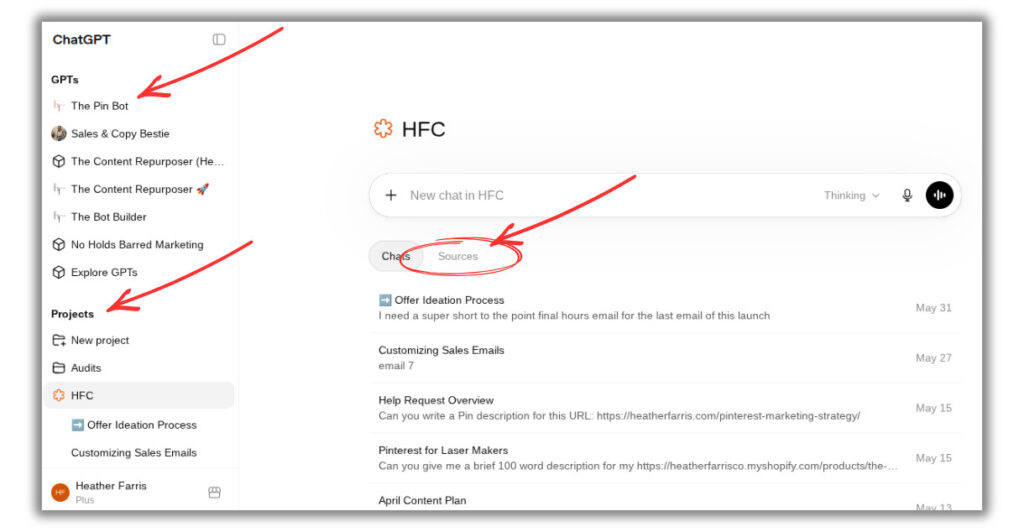
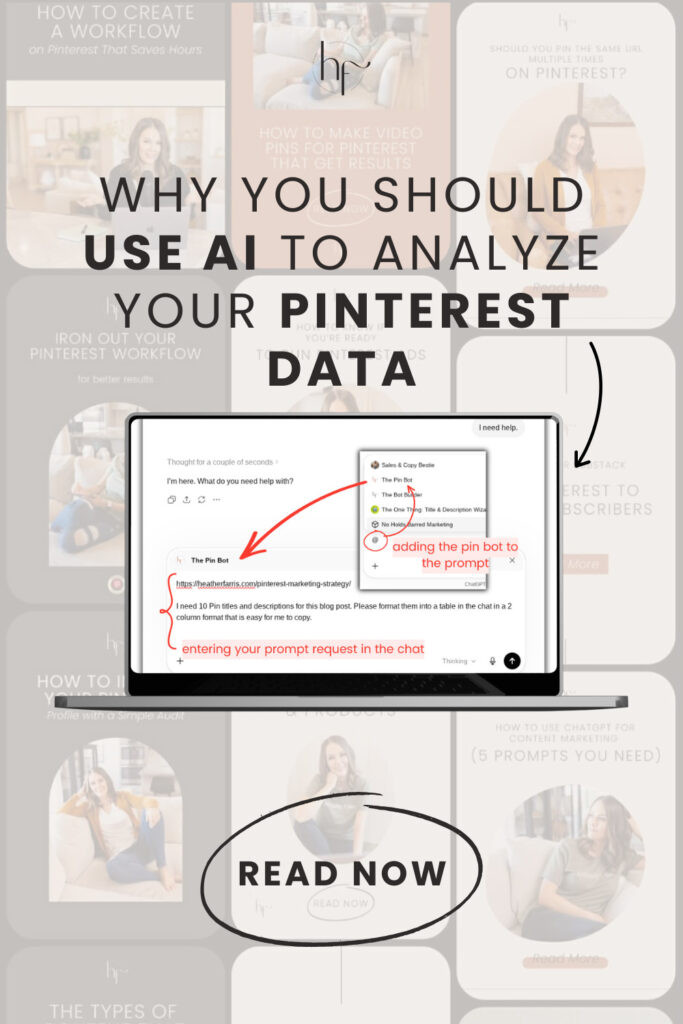
You can actually use the custom GPT inside of your project file, but I’m going to show you exactly what I do even from a single chat. What I would do is this:
- Open a new chat.
- Tell it “I need help”, letting it start to run.
- Click the ‘Stop’ button.
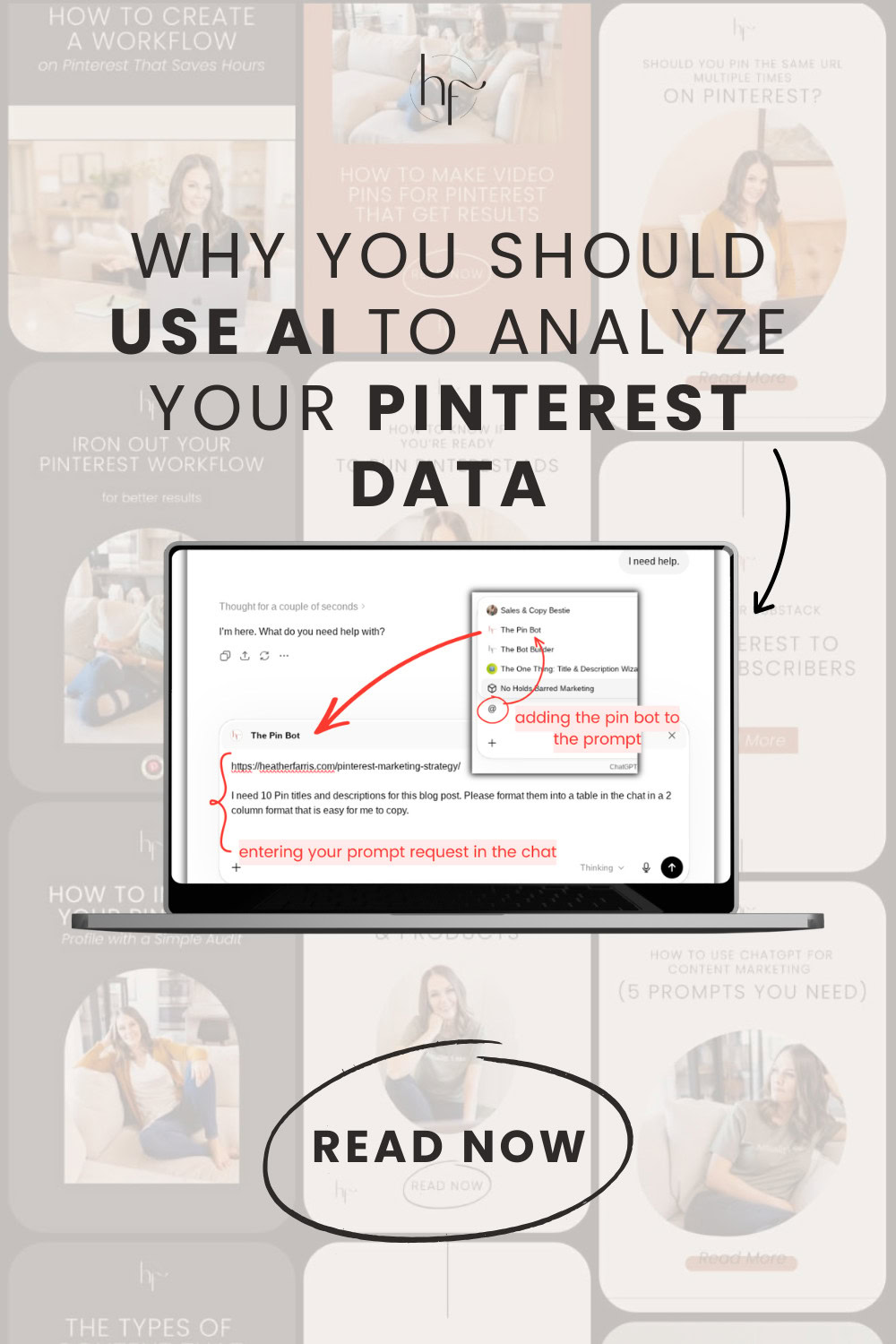
- Paste in the prompts and referenced links that I want it to use (further examples below).
- Add the Pin Bot with an @ symbol.
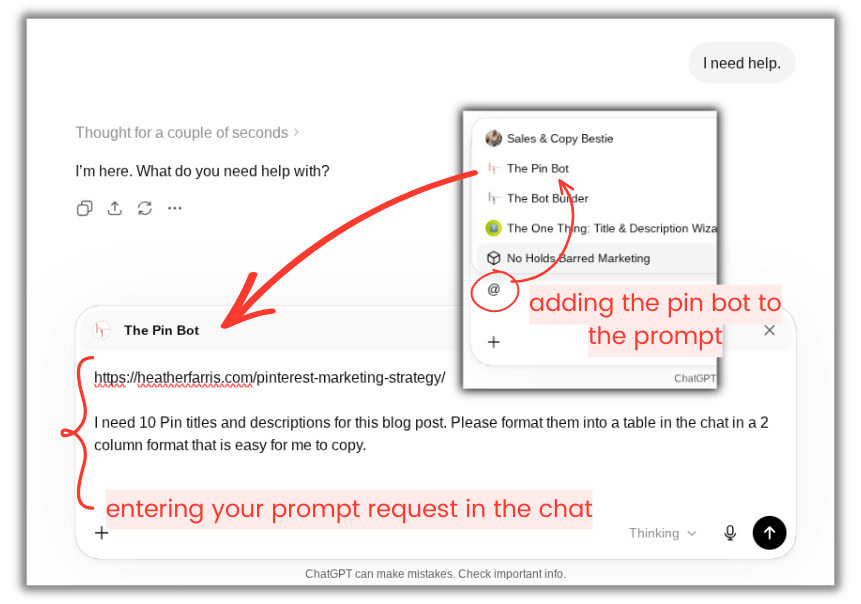
Prompt 1: Creating pin titles and descriptions
This first prompt is for creating titles and descriptions for a blog post, and that’s the first and main way that I actually use the Pin Bot for myself and clients. After entering my link, the prompt, and selecting the Pin Bot to run the query, I hit ‘Enter’ as if to let it go.
But then I’ll hit ‘Stop’ again. Why? I’ll move the chat into my custom project folder, then go back into the chat and say, “Hey, you’ve been moved into my custom project folder, so now you can reference all of my source information about my business.”
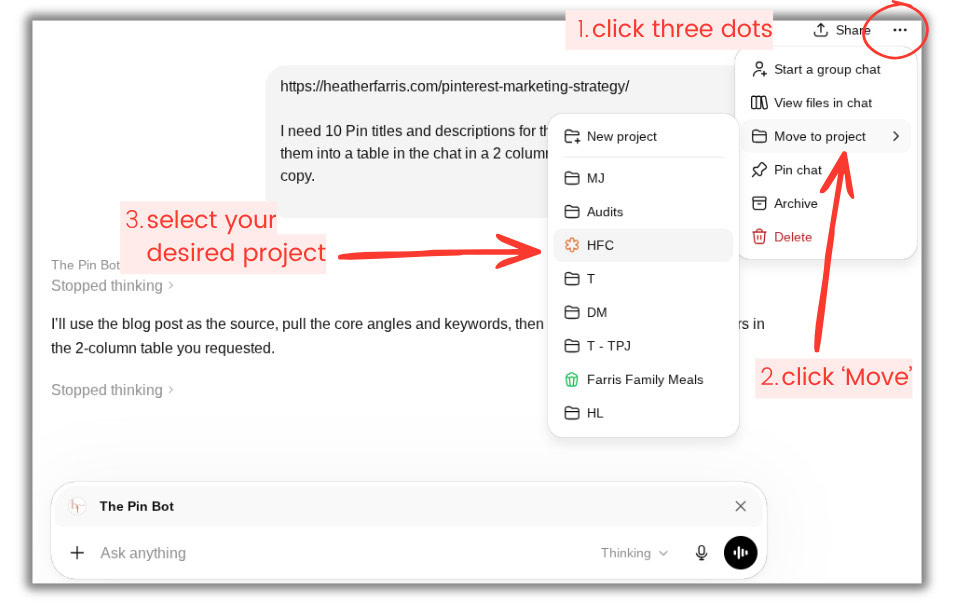
Now, it’s going to read its own source material, its training, and formulate a much more optimized and specific result better for my content and my audience. Sometimes it gets a little confused because I stopped it a couple of times in the midst of going. But if needed, I can just re-paste anything needed, and it’s going to still work on your prompt just fine.
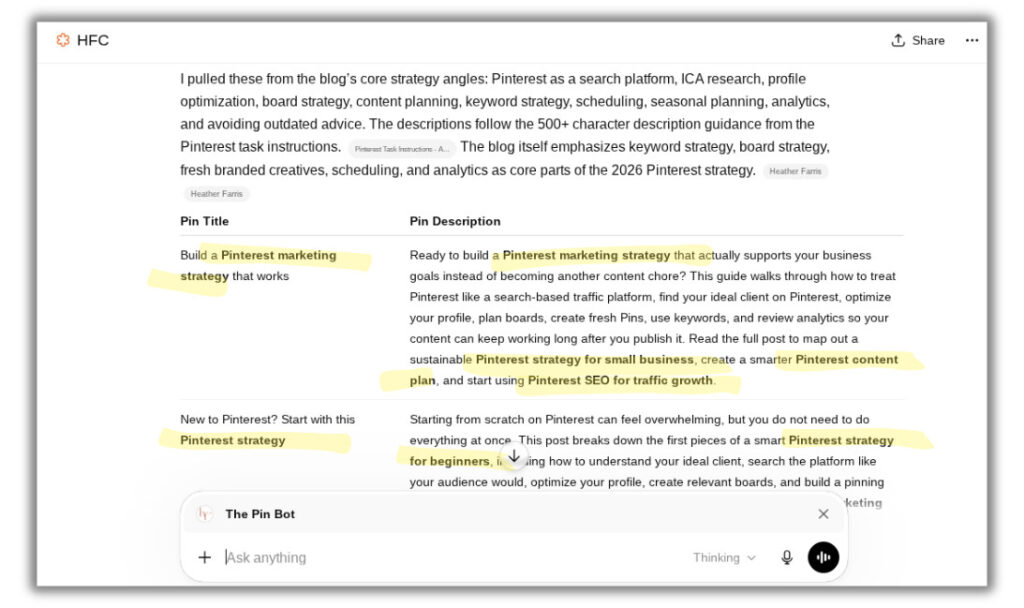
The output will highlight specific keywords in bold, I have it designed that way. So you can confirm any specific keywords you want targeted, or see what your source information is providing and influencing in the results.
RELATED: How to Write Your Pinterest Descriptions to Get More Clicks & Rank Higher
Method 3: Brainstorming new angles
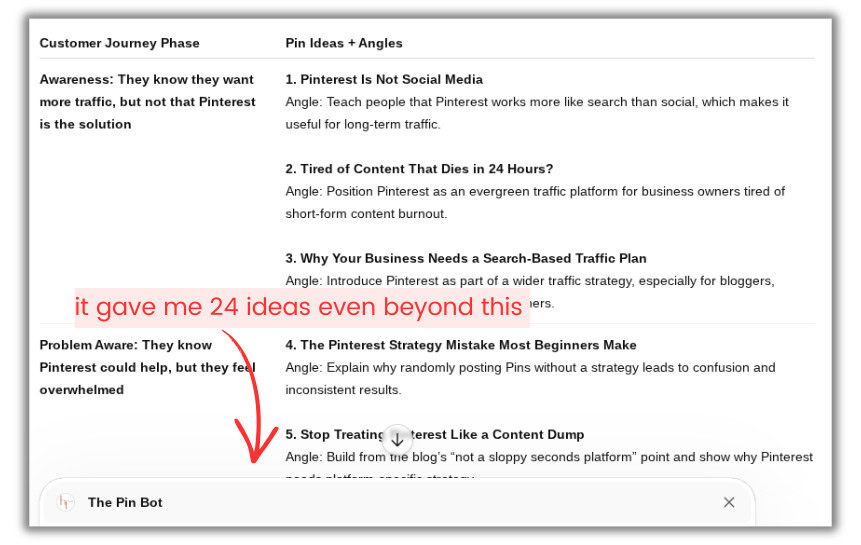
This blog post is a master pillar post I update every single year, so I pin it a lot and these titles it came up with are very similar to all the titles that I use regularly. And I’m kinda bored with these, so I really want to get something new and fresh in here.
For this next prompt, I’m going to go ahead and tell it I want to ideate new angles and help me to do that across the customer journey. It gave me 24 new angles, and specified parts of the customer journey that I don’t even usually focus on too, so that’s refreshing.
RELATED: Pinterest Pin Title Strategies For Bloggers
Method 3: Analyzing Pinterest data
The next way I use ChatGPT for Pinterest is to analyze my Pinterest data, and this is probably my favorite and most powerful thing I use the Pin Bot for. Prior to this, I went and downloaded all of the material that I would need for this audit in my Pinterest Analytics.
- Audience insights
- Profile screenshots
- Pin impressions
- Pin saves
- Pin clicks
- Outbound clicks
- Top boards
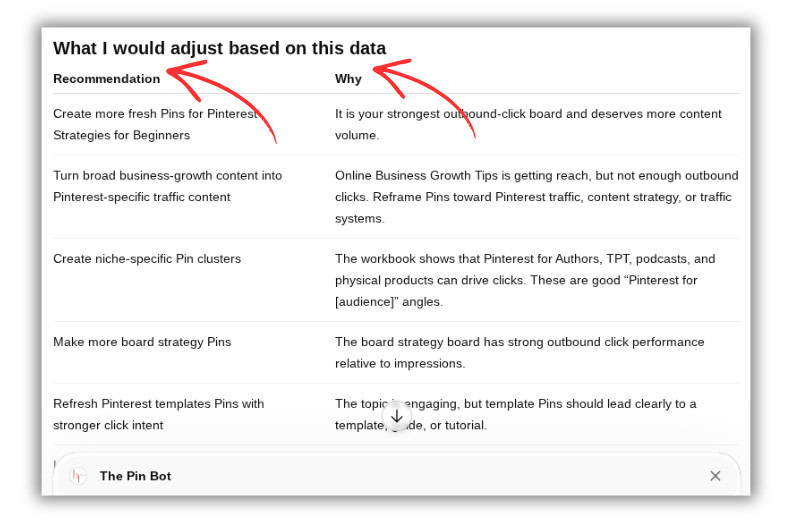
I went and grabbed the Pinterest data that I wanted, I took screenshots of my profile, and I pulled all of that together into an Excel file. I pasted in my prompt, uploaded all my files to the chat, and let it analyze and run. This analysis is going to take longer, a few minutes at least. So go do something and come back, don’t worry because it’s still faster than you doing all of this analysis manually yourself.
What it gave me and what I can do with this information:
- Executive Summary – confirms that I’m hitting what I’m targeting because the content is clearly coming through.
- What’s Working – topics for good pins separated across engagement, outbound clicks, what boards are working well, etc.
- Strongest Themes – areas to focus on next for best odds of growth and increased engagement on the platform.
- Suggested Adjustments – specific things to do where my account may be lacking or what to fix for the better. (I loved this!)
RELATED: Pinterest Analytics: What to Do With Your Pinterest Data
Method 4: Getting board ideas
Now, the final thing that I like to do with ChatGPT for Pinterest, is ask it for board ideas. How I do this for my students and clients is to upload the current Pinterest Trends data, and compare it against your audit data that it’s already analyzed. From that, it can give you:
- Boards that you should create because you have gaps
- Boards that you should pin to more
- Keywords that you should use for those boards
- Board descriptions or if you need to update them
This is really, really great for anyone just starting out on Pinterest because if you’re not sure what boards to start with, this bot can help you if you feed it the right information. Plus, if you don’t have a lot of historical data to use, applying the trends data is hitting the ground running on what is already popular on the platform.
RELATED: How to use Pinterest Trends with the New Updates
Final thoughts on using custom ChatGPT for Pinterest
I created the Pin Bot as a custom ChatGPT for Pinterest because it’s a tool that I want to analyze and create ideas for me that I wish existed before. So now, using it in these ways, it will save you massive time and mental energy in creating great content for Pinterest and optimizing your presence for your audience.
If you want more support and proven systems for your entire Pinterest marketing strategy, you can always join Pin Profit Academy. It is come as you want, leave when you want kind of place, no pressure whatsoever. Me and my community would love to help you more personally in getting your Pinterest marketing for you small business aligned with great results. So come join us!

Pin Profit Academy
Marketing can be difficult and trying to figure it out on your own, especially with Pinterest, can be overwhelming.
I will show you how to double your traffic and sales without spending another minute on social media!
PPA is the only comprehensive membership program & community for creating, marketing & selling your products & services using Pinterest.
Pin it for later

Free Pinterest Resource
Download my FREE Pinterest Prompts for ChatGPT
Speed up your Pinterest workflow with plug-n-play ChatGPT prompts that help you create Pin titles, Pin descriptions, topic ideas, and more.
Get the Free Prompts
Heather Farris went to school for accounting and worked for years in banking and finance. After finding all of that entirely too boring she started her first blog in her basement in August of 2016. She has started 3 blogs in the marketing, motherhood and travel niches and used Pinterest to grow them all. She quickly became the go-to Pinterest strategist in her peer circles and has been implementing strategies, driving traffic and sales through organic and paid tactics for her clients. On this blog and her YouTube channel, as a renowned Pinterest marketing expert, she educates the public about clear and transparent marketing strategies to help them to grow on Pinterest and in other places online. She created Pin Profit Academy and helps small business owners just like you to master their Pinterest marketing strategy. Heather is now a Pinterest Educator, one of the very few sponsored by Pinterest.