

Pinterest SEO Mistakes Hiding on Your Website
There’s possibly a few sneaky little Pinterest SEO mistakes hiding on your website that are doing you no favors. Your website metadata is just as important to Pinterest success as your pin design and keywords.
Most Pinterest marketers completely miss this critical piece of their strategy, and we’re here to set the record straight. In this post, we’re going to talk about:
- Why your website images might not be pinnable.
- How weak metadata is silently killing your reach.
- Exactly what to audit on your site to fix these Pinterest SEO mistakes before they cost you more traffic.
- The specific steps to optimize your website for Pinterest.
- How to enable your site visitors to become your Pinterest content creators.
This one overlooked strategy could be the missing link between your current results and the Pinterest success you’ve been working hard to achieve. So let’s dive in!
Where Pinterest SEO Really Starts
Most people think that their Pinterest SEO starts on Pinterest itself, and then just stays there. But the full picture is not represented here.
A full Pinterest SEO strategy also includes the information on your website:
- Blog posts
- Shop or store pages
- Product listings
- Sales or landing pages
- Optin pages
In a lot of cases, you can use plugin tools like Yoast, or Social Warfare, specifically for Pinterest, to specify what your pin imagery and meta data is going to be. If someone pins from your website, or shares your content elsewhere, if you haven’t put in the SEO descriptions on your website, it won’t come across clean or optimized to where it’s shared. Then often it isn’t useful to you at all.
RELATED: Pinterest SEO Strategies: Ultimate Guide to Boost Traffic
The No Pin Description Problem
The first of you Pinterest SEO mistakes is when someone clicks my “Pin it” button on one of my blogs, these are the two pins that actually show up for someone to pin. I’ve specified these two to ensure I have quality images pinned from viewers, but depending on your share button plugins, a viewer can see any image on the page pop up as an option.
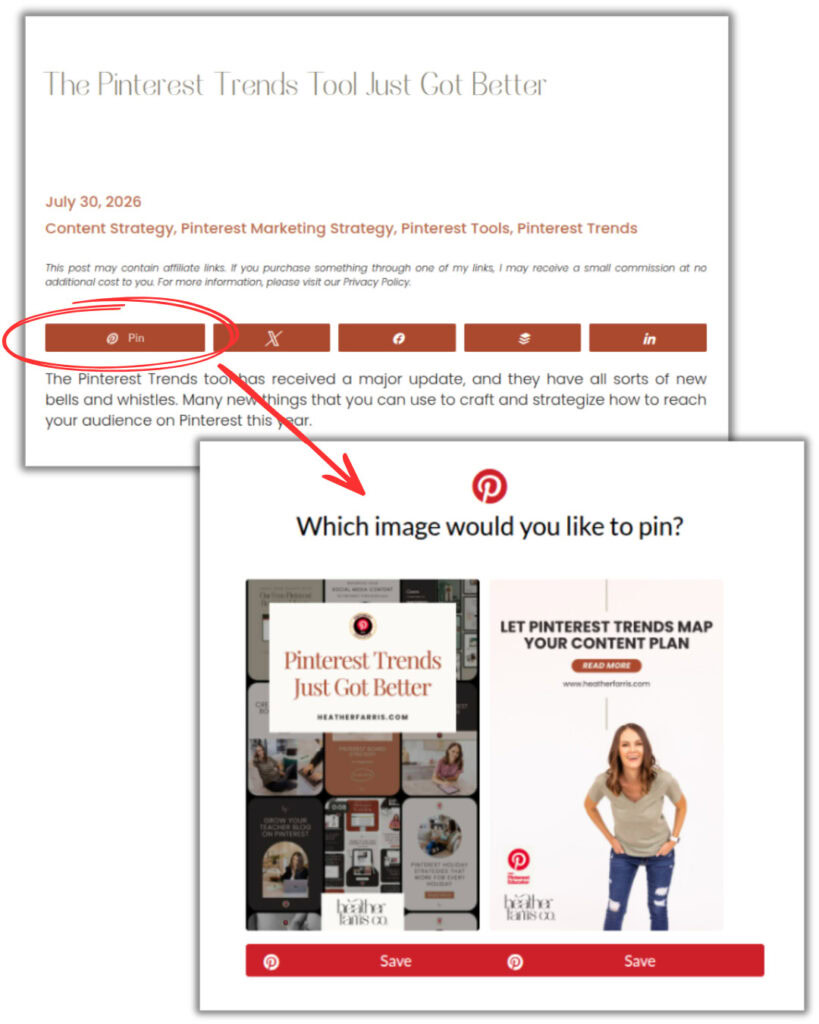
But when they go to pin to their own boards, they cannot edit or even see the pin title, description, and URL data that comes with it. So they pin it to a board and they can’t change it. You definitely want to have the right information already there before they pin, so that Pinterest can index it right, and serve that content to the right group of people. Optimized from the start.
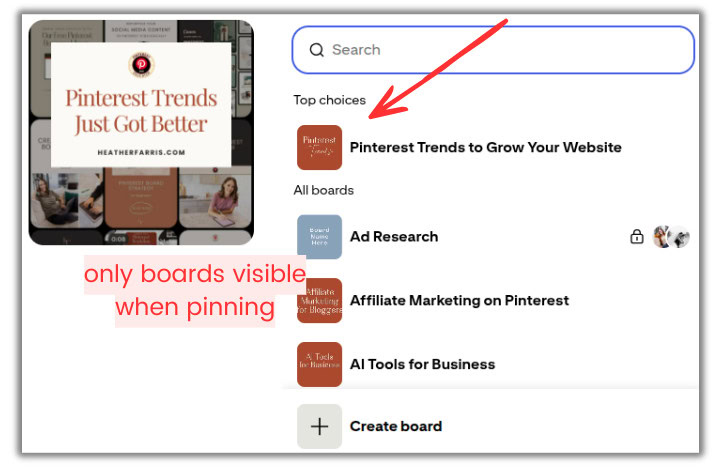
A lot of the Pinterest activity doesn’t actually come from you on Pinterest alone. It actually comes from people going to your website, and potentially coming back around and saving additional pins.
Say you find other people’s pins of your content through your analytics reports that don’t have pin descriptions. But you can’t edit other people’s pins of your content on Pinterest. So you have to make sure the SEO data is optimized on your website first.
RELATED: How to Optimize Your Blog Content for Pinterest Users
Making Your Website Images Pinnable
The next of hidden Pinterest SEO mistakes is when your website images just are not pinnable. They are not Pinterest friendly. There are so many things that you could be doing wrong here, but ultimately, the thing that I want you to focus on is the metadata today. You can fix the images, but even if they’re fabulous, leaving out the metadata is the mistake we don’t want.
You can get better at design, but if you never get better at your website and content SEO this way, then what’s the point? You’re doing all this work, but you’re losing out on valuable pieces of your overall website strategy.
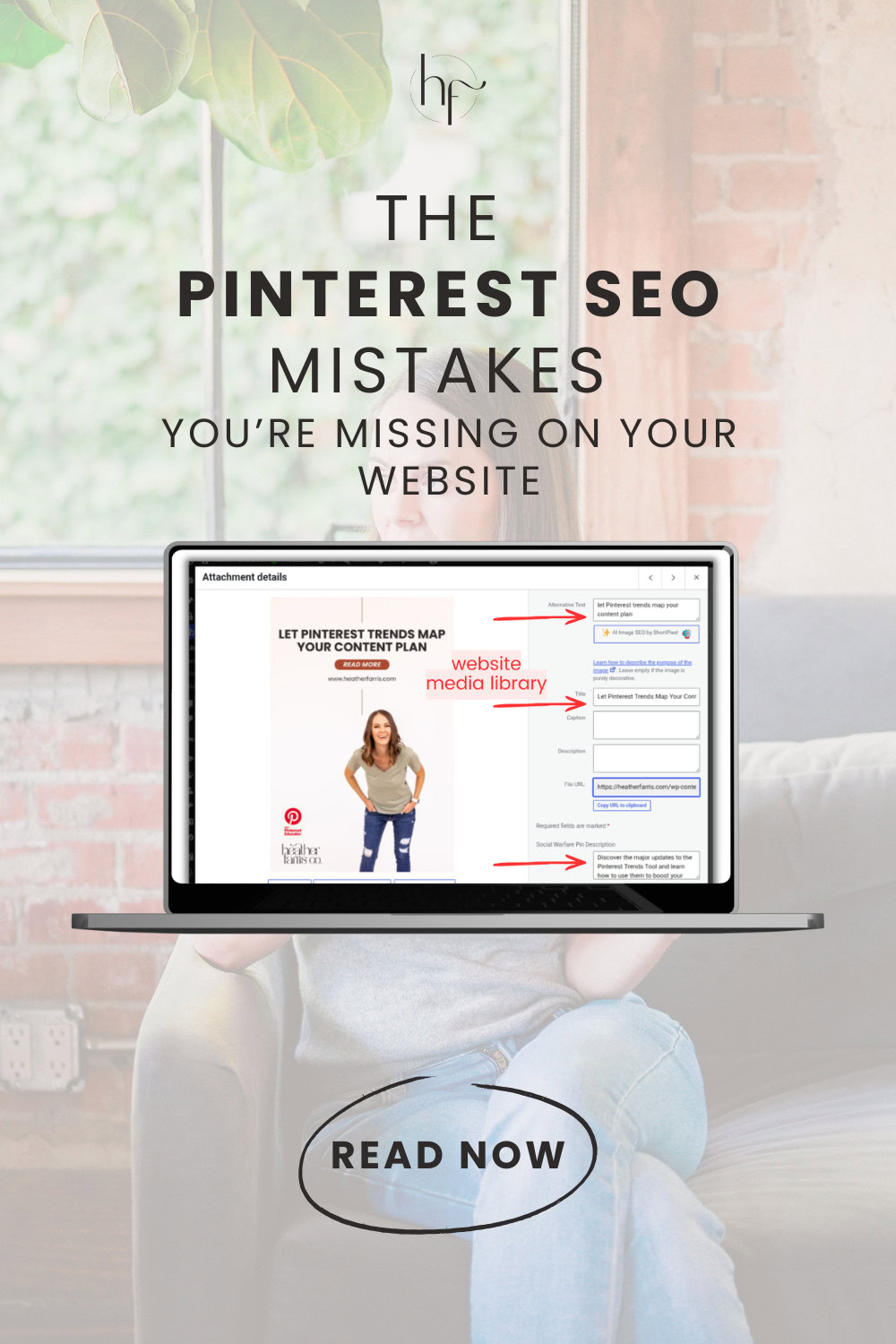
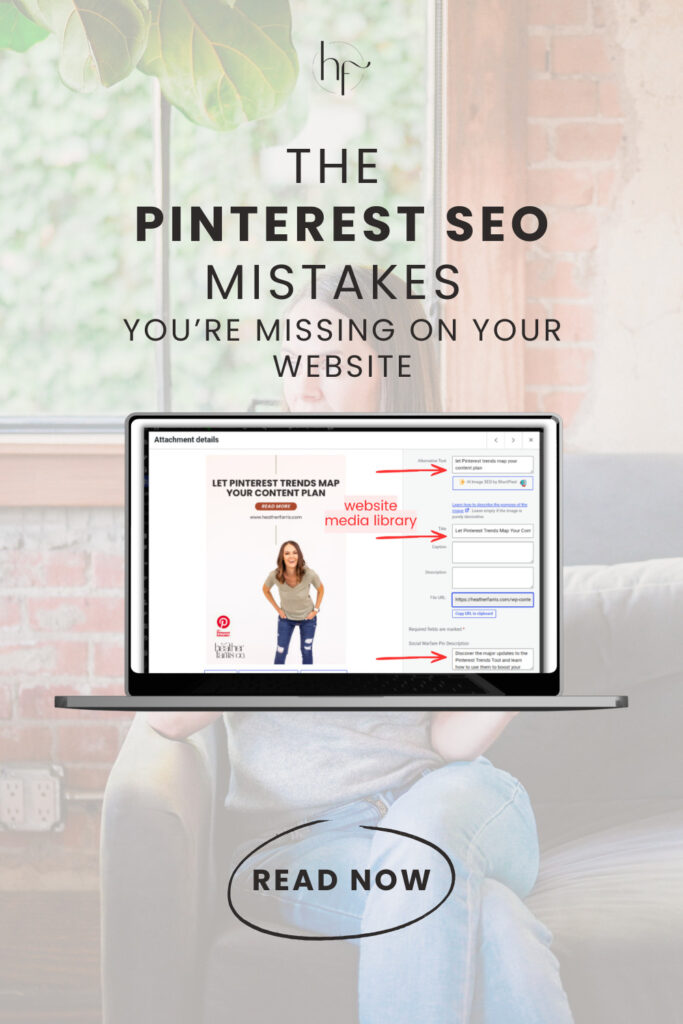
No matter what plugins you have, ideally, you’re doing the following no matter what. When you are uploading content to your media library, you are including:
- Keyword optimized image title
- Keyword in the alt text
- 700-800 character keyword optimized image description
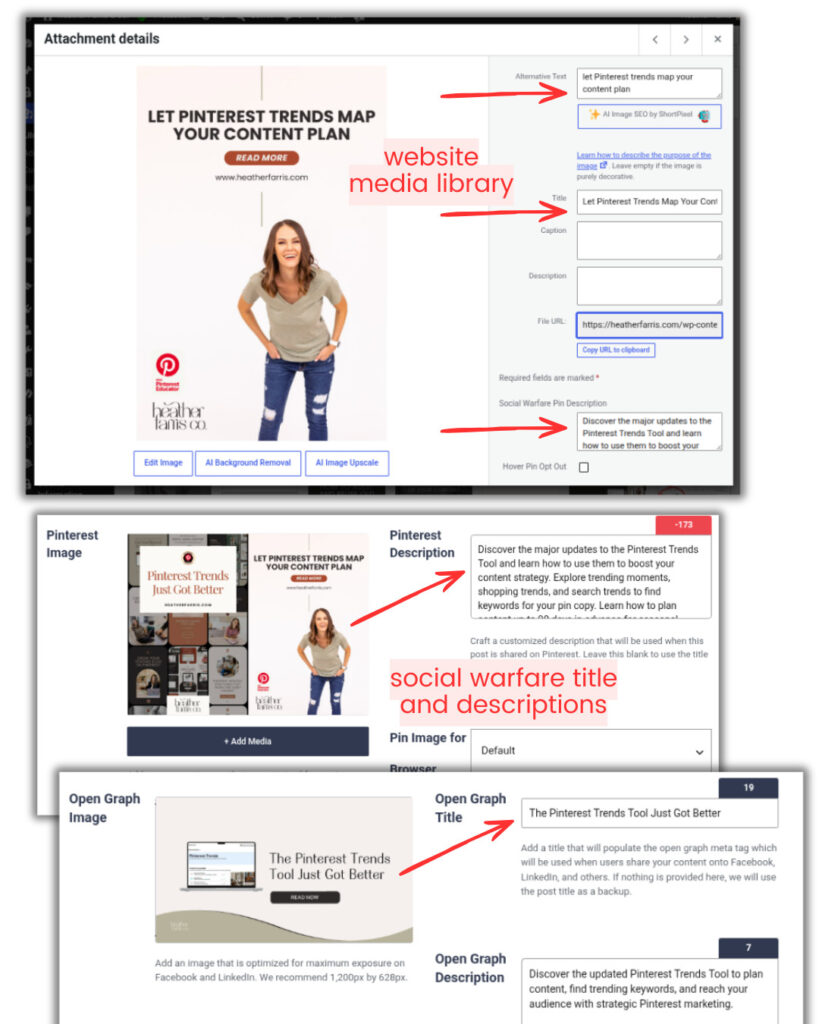
I recommend you have a sharing specific plugin, like Social Warfare, where you can specify the exact images you prefer. And it also has built in meta data for those images no matter where they get shared to. Then, what’s going to happen is Pinterest will pull that information from the website itself and stick it right on published pins automatically.
RELATED: The Best Pinterest Social Sharing Plugins for WordPress
Why Pinterest SEO Mistakes Affect Your Pinterest Performance
Now, let’s talk briefly about why this can affect your Pinterest performance. Number one is Pinterest needs signals to understand:
- what your pin is about
- who it’s for
- what searches it could appear within
- what search terms should it be indexed for
- what board it should fit on
Website saved pins can be watered down and weakened if the description is missing, if the title is generic, if you’re only using the same blog title every single time with your manually made pins as your website saved pins. So, you want to have optimization, but also some different variety.
I want to give you an example of this kinda going wrong even for me. There has been someone that saved a Pinterest logo from my website, and it is one of my top pins and has been for a long time for some reason. They’ve also saved a generic image frame. I found these in my Top Pins analytics data.
Now, these are not really doing me any favors. I can’t really fix them now on the Pinterest side. But I can fix them on my website. So, I need to go to these URLs that show up in my Pinterest Analytics, and make sure that people cannot pin those specific icons anymore. That is something that I can now go fix, which brings us into a quick website audit for Pinterest SEO.
RELATED: Pinterest Analytics: A Simple Guide to Read & Analyze Your Data
Website Audit For Pinterest SEO
Now, before we get into that list, I do want to tell you that metadata is not the only ranking factor when it comes to both your website SEO and your Pinterest SEO. But for this specific mistake we’re covering today, it is something that a lot of people are just completely missing the boat on.
A true audit for Pinterest SEO is going to look like this:
- Checking top pages for traffic on Pinterest.
- Check what’s happening with your ‘Pin it’ button.
- Review all the meta data on your images.
- Do the entire process again on your mobile phone.
Number one is check your top pages for traffic on Pinterest. Inside of your Pinterest Analytics, scroll down to ‘Top Pins’, then sort your results by ‘Outbound clicks’.
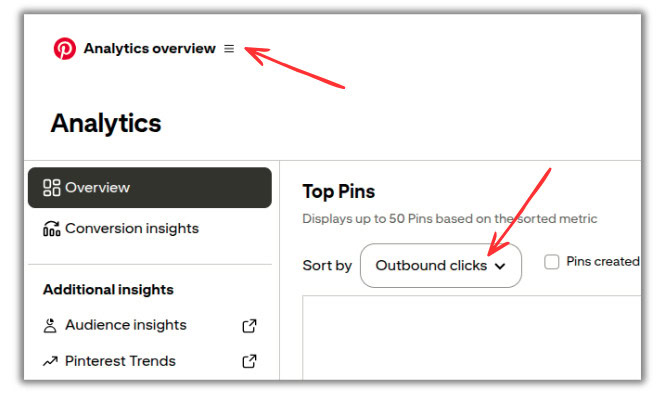
Go through all of these pins, and just make sure that they all have the right and optimized metadata on them. Would even be a great way to optimize them again, especially if they’re quite old or your messaging has adjusted slightly.
Next you want to check your ‘Pin it’ and share buttons, what it’s doing on your blog or shop site. From your same outbound clicks report, go to those blog posts from those pins. Save the images from your sharing buttons like you’re a typical reader, save them from your browser ‘Pin It’ button.
You can put them on a private board you’re testing with in case they have issues. Then check all of those pins you saved, and make sure that they all look good and are pulling in the metadata you’ve specified.
RELATED: The Ultimate Pinterest Traffic Strategy for Bloggers & E-Commerce Shops
Audit Optimization Tweaks That Should Be Standard
I want you to look at the image options available when you do click the ‘Pin It’ button. Are there images in there that you should not have in there? If there are, there is code that you can get to fix that. If you’re interested in implementing that on your site, you can reach out to me via email and we can talk about it, because it is website specific. But you can specify which images will not be allowed to be shared.
More things to make sure you have optimized:
- Is your title keyword rich?
- Is it a Pinterest keyword too and not just a Google keyword?
- Is your image description 500-800 characters long?
- Does it contain the Pinterest keywords you want?
- Is your URL linking to the correct page?
- Or is it an old promotion or non-existent?
Then you want to repeat the whole entire process on your mobile phone. Most of your viewers are on their phones, so make sure that everything looks good on mobile. It might be working just fine on desktop, and then not transfer well on mobile because of your site or theme settings. Don’t skip this!
RELATED: Why You Need to Optimize Your Website for Pinterest

The Pin Bot for ChatGPT — Your Pinterest Marketing Sidekick
Stop spending hours writing pin descriptions, SEO blogs, or brainstorming your Pinterest strategy.
The Pin Bot for ChatGPT is your ready-to-use Pinterest marketing assistant, pre-loaded with proven templates so you can create, plan, and optimize content in minutes.
Looking at Older Content With Your Audit
Now, you don’t have to start and do a full website audit in one day; it’s quite impossible to correct all of your Pinterest SEO mistakes right away. Of course, we’d like every scrap of anything we create to be optimized at all times. But I get it, things get old and missed. Just start with five to 10 pages.
- Start with your top Pinterest pins and referral pages.
- Then move on to seasonal content that’s coming up soon in your Pinterest Trends.
- Next do your evergreen pages with the most potential in both saves and shopping.
- Review your top posts or pages from your Google Analytics.
- Do not forget your Top Pins in the impressions list!
- Gradually go through outdated content, especially if it’s more active in your reports.
Because there may be seasonal content that’s coming soon showing high in impressions, but it’s not showing in saves or clicksthroughs just yet. If it’s high on impressions and it’s not even optimized, imagine how much better it will perform when you update it.
When you’re looking at older content on your website, it’s a good time to also update branding or outdated information. For me specifically, I still have old posts that I have updated, but there are pins from other viewers that keep hanging on, which is fine. But I’ve cleaned up everything I can on my side. So if you have pins that are showing up in your list with older outdated branding, go update those pages with new pins, and new branding.
RELATED: The Pinterest Trends Tool Just Got Better
Not Everything Needs to Be Pinterest Friendly
Now, I want to just call something out here briefly. Not every single image in your blog post needs to be Pinterest friendly. You don’t want to waste time making your blog imagery the same as all your Pinterest pins.
Most likely your content isn’t about Pinterest marketing like mine, where it’s more applicable. But even it’s tacky and stuffy to have everything looking like a Pinterest pin. You’ll have organic images you’ve taken with your phone. Or screenshots for tutorials, like I do on this very page.
We’re not talking about those. That would be like the Instagram influencers making everything they ever create as an IG carousel or templated. Have some personal creativity as well that matches your content and what resonates with both you and your audience.
RELATED: How to Optimize Your Instagram Content for Pinterest
No More Pinterest SEO Mistakes on Your Website
Most Pinterest marketers are only doing half of the equation. They’re creating beautiful pins and scheduling them strategically, but they’re completely overlooking the goldmine sitting right on their own website.
Every single day, your site visitors have the opportunity to become your Pinterest content creators too by amplifying your reach without you lifting a finger. But only if you’ve done the work to make that possible.
When you optimize your website metadata, you’re not just checking a box. You’re eliminating the Pinterest SEO mistakes that hinder your marketing strategy, and instead:
- You’re giving Pinterest the context it needs to understand your content for its algorithm,
- You’re indexing it correctly, so Pinterest can serve it to people who are actively looking for what you offer.
- You’re eliminating the “no pin description” problem that’s messing with your visibility.
- You’re ensuring that no matter how someone saves a pin from your site, they’re seeing exactly what you want them to see.
- Pinterest is getting the signals it needs to promote that pin to the right audience.
The result? Your content reaches more people. Your pins get more impressions, clicks, and saves. Your website traffic increases. And you’ve built a system that works for you even when you’re not actively pinning.
RELATED: The Complete Pinterest Marketing Strategy I Tell My Friends
Take Your Pinterest Strategy to the Next Level
This is foundational work, and it matters. But I know that Pinterest marketing can feel overwhelming when you’re trying to figure it all out on your own. That’s exactly why I created Pin Profit Academy.
In the Academy, we go deep. You’ll learn not just the “what” and the “why,” but the exact “how” for every aspect of your Pinterest marketing strategy. You’ll have access to step-by-step training, done-for-you templates, and a community of Pinterest marketers who are on the same journey as you. Plus, you’ll get my direct support on our private calls.
If you’re serious about using Pinterest to drive real, consistent traffic to your website and grow your business, the academy is the best investment you can make. Join us, and let’s build you a Pinterest strategy that actually works. See you inside!
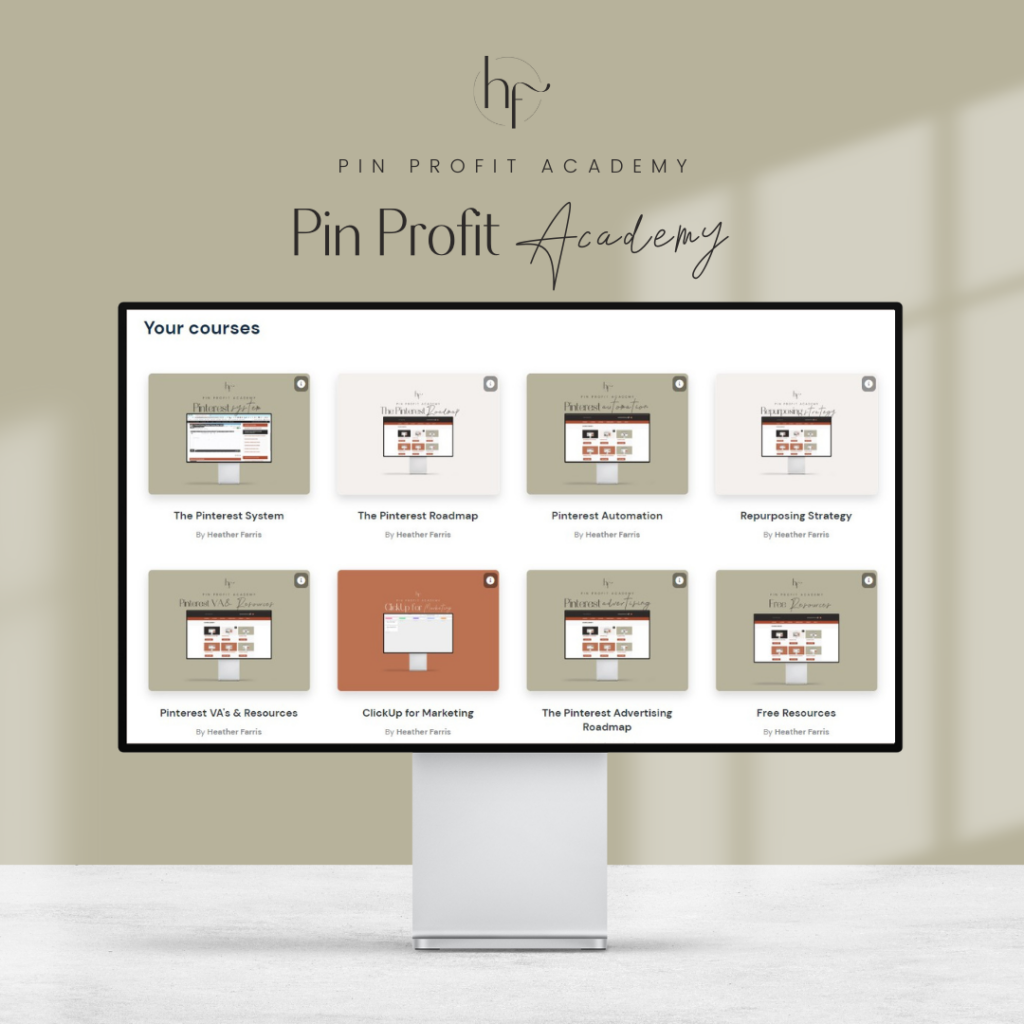
Pin Profit Academy
Marketing can be difficult and trying to figure it out on your own, especially with Pinterest, can be overwhelming.
I will show you how to double your traffic and sales without spending another minute on social media!
PPA is the only comprehensive membership program & community for creating, marketing & selling your products & services using Pinterest.
Pin it for later

Heather Farris went to school for accounting and worked for years in banking and finance. After finding all of that entirely too boring she started her first blog in her basement in August of 2016. She has started 3 blogs in the marketing, motherhood and travel niches and used Pinterest to grow them all. She quickly became the go-to Pinterest strategist in her peer circles and has been implementing strategies, driving traffic and sales through organic and paid tactics for her clients. On this blog and her YouTube channel, as a renowned Pinterest marketing expert, she educates the public about clear and transparent marketing strategies to help them to grow on Pinterest and in other places online. She created Pin Profit Academy and helps small business owners just like you to master their Pinterest marketing strategy. Heather is now a Pinterest Educator, one of the very few sponsored by Pinterest.