


The Best Pinterest Social Sharing Plugins for WordPress
Having dedicated social sharing buttons for your website will allow you to dictate what gets shared and how. I love using Pinterest social sharing plugins on my website to do this heavy lifting for me. As a Pinterest pro I get asked a lot which plugins I would recommend for a WordPress website and Pinterest together specifically.
In today’s post, I’m going to show you how to use the plugin I use and give you a few other options. If you use Pinterest with your marketing strategy, knowing which social sharing plugins that also include Pinterest is vital, in addition to your regular social media platforms.
Social Warfare Pro: Best of all Pinterest social sharing plugins
I personally use Social Warfare Pro on both my website here and my travel blog. I have used it for years and have never had an issue. The simplicity and the affordability of this plugin is why I have stuck with them for so long.
To use this plugin for WordPress you do need the free version and the $29/year paid version on your site. It’s two separate plugins that work with each other. You can edit the appearance of the buttons, the sharing counts and what platforms you want to show. This is all very helpful in customizing the plugin to your needs.
RELATED: How to Optimize Your Blog Content for Pinterest Users
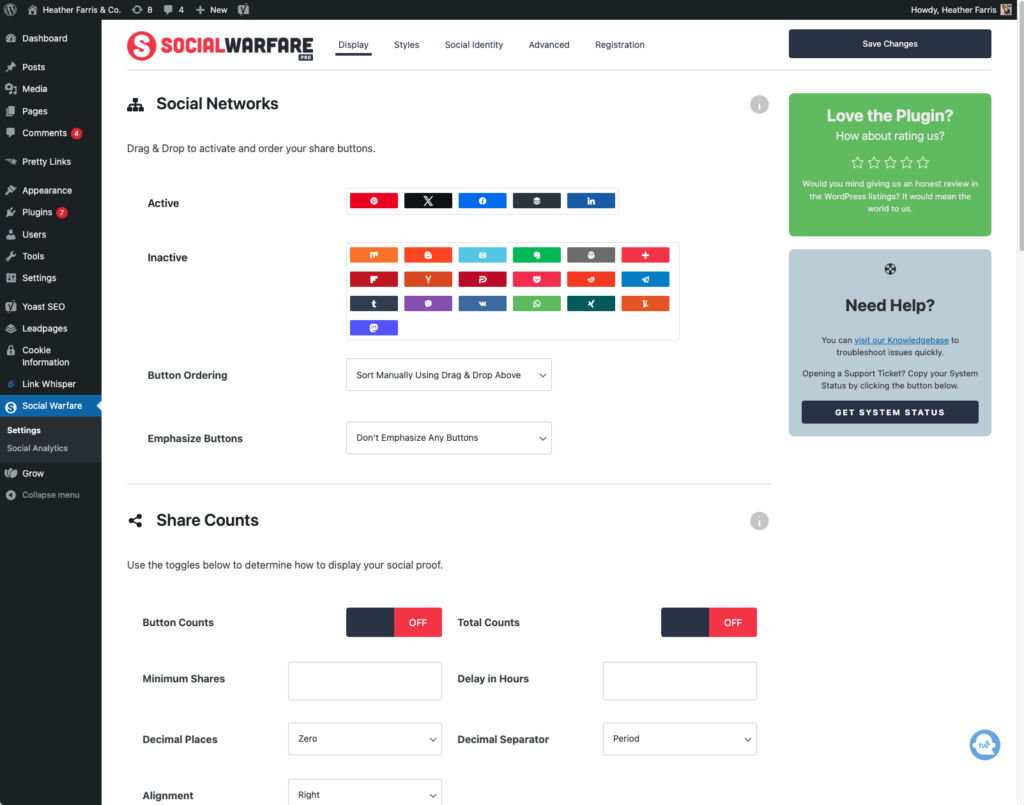
Social Warfare settings
To edit your settings head into your Social Warfare menu on the left sidebar. From there you can access the display, style, social identity & advanced settings.
Pinterest customization settings
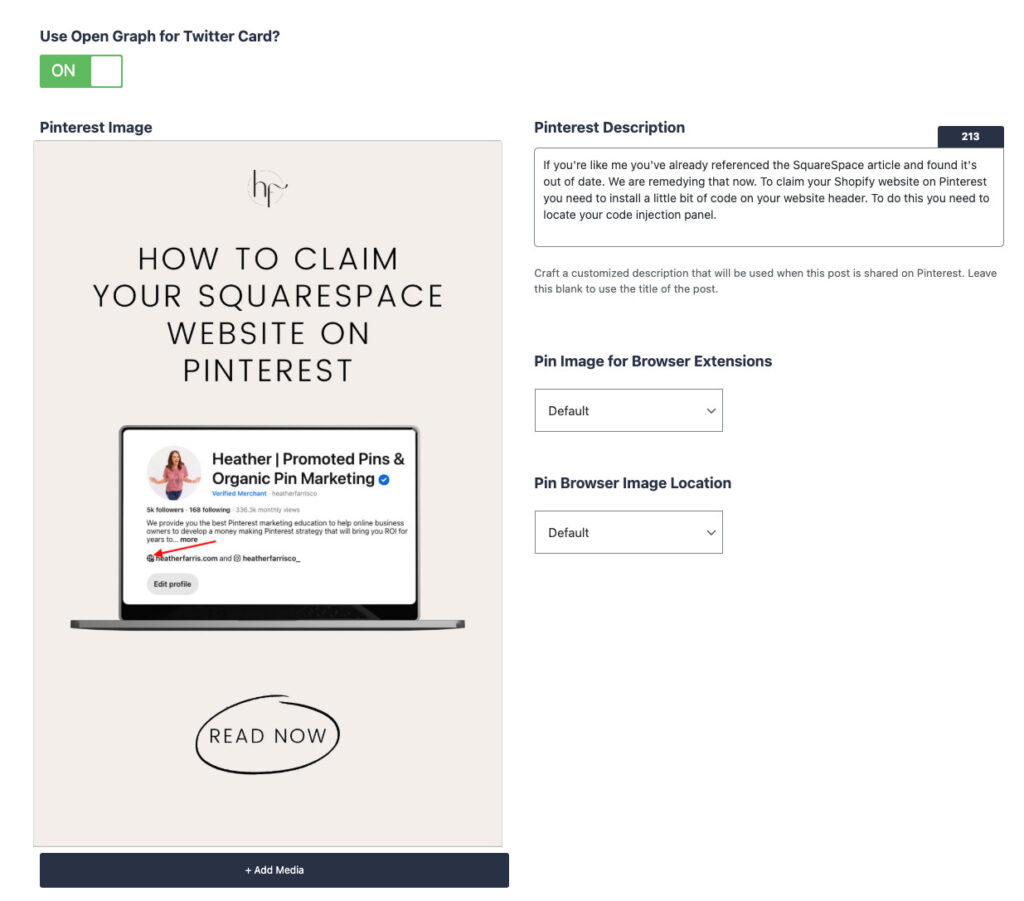
The best part about using Social Warfare on your WordPress site is the ability to fully customize the content that gets shared with the images you assign. This is why it’s my favorite and I highly recommend it if you’re using Pinterest.
Within each blog post, you can specify your pin title, description, and alt text. You write your pin description and the plugin does the rest, integrated right within WordPress. You can control which images are options as Pinterest pins so that your audience pins optimized content.
Hover buttons
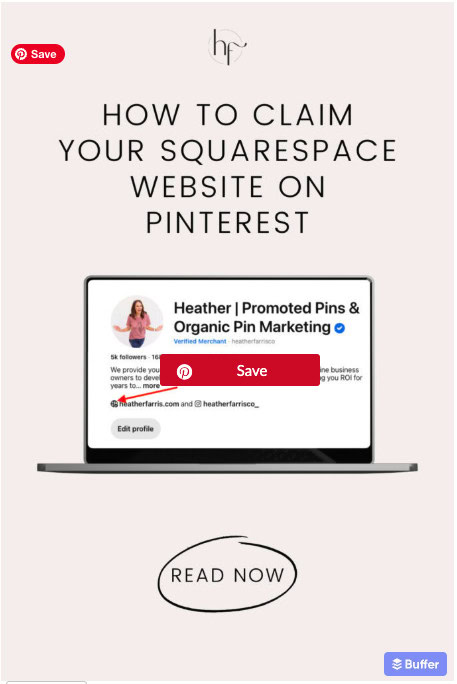
Turning on hover buttons allows you to control which images get shared from the website. The big red save button in the middle of this image is the hover button from my plugin. The little pill in the top left hand corner of the image is my browser extension save button.
RELATED: Why You Need to Optimize Your Website for Pinterest
Button locations
Your sharing button locations are dictated in your plugin’s global settings and you can edit them on a per post or page basis. They can appear above, below, on the side, and even float along with readers so they’re always visible. These buttons are what you see at the top of my blog posts.

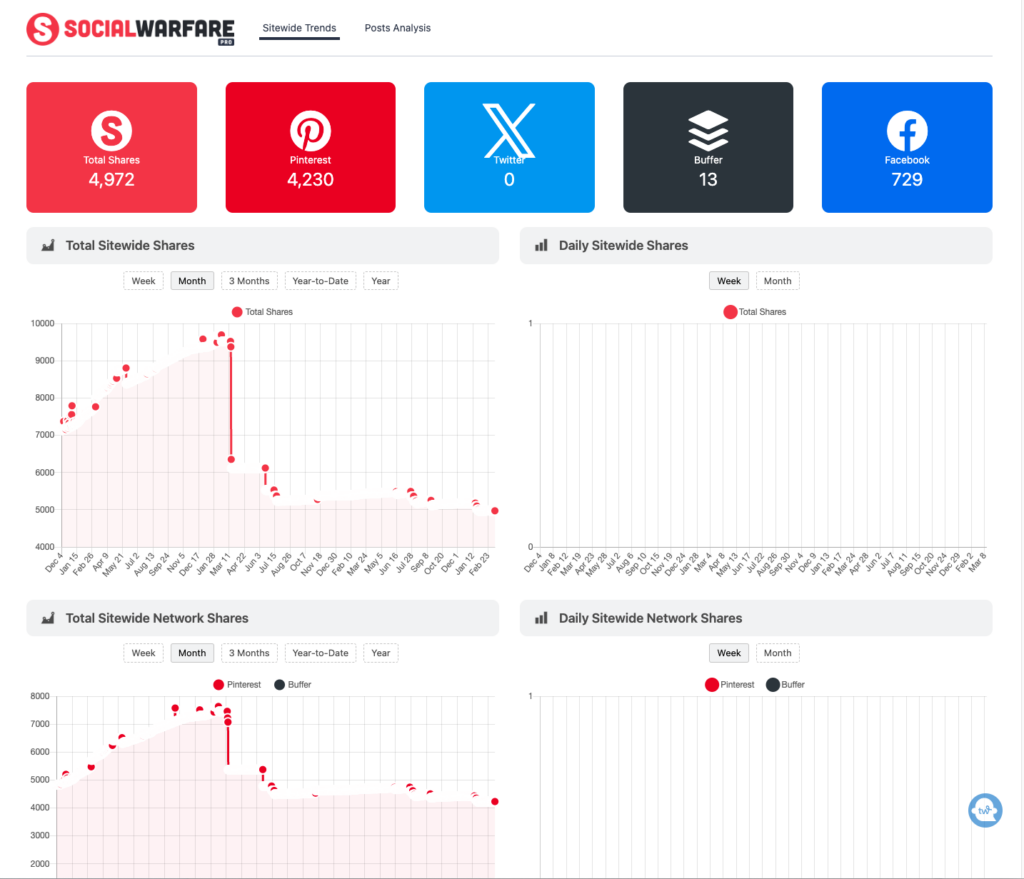
Sitewide trends and post analysis
Inside of your Social Warfare settings you can find this dashboard to see your overall stats for the plugin. I have never used this feature and I’m seeing it for the first time right alongside you. I’ll explore more and may update info on this benefit soon.
RELATED: Pinterest Analytics: What to Do With Your Pinterest Data
Other Pinterest social sharing plugins for WordPress
Here are two other popular Pinterest social sharing plugins for WordPress that you may enjoy. I have not used these personally, but they are used by some other creators that I know and recommended by them.
- Tasy Pins
- Hubbub
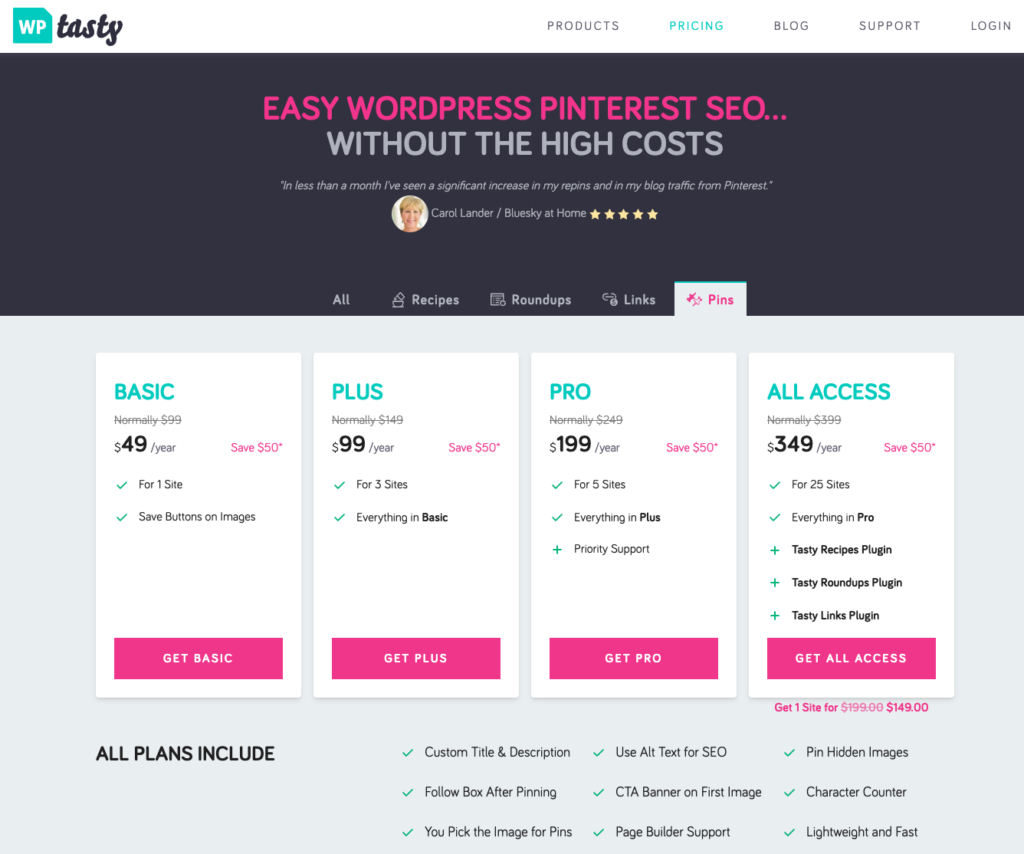
Tasty Pins – $49/year for basic
Tasty Pins is a WordPress plugin that I believe was originally designed for food bloggers, but they created versions of it to allow you to just use it for Pinterest if you’d like to. The pricing on their “Pins only” version is really affordable if you’re looking for a 1 site license.
Hubbub – $49/year
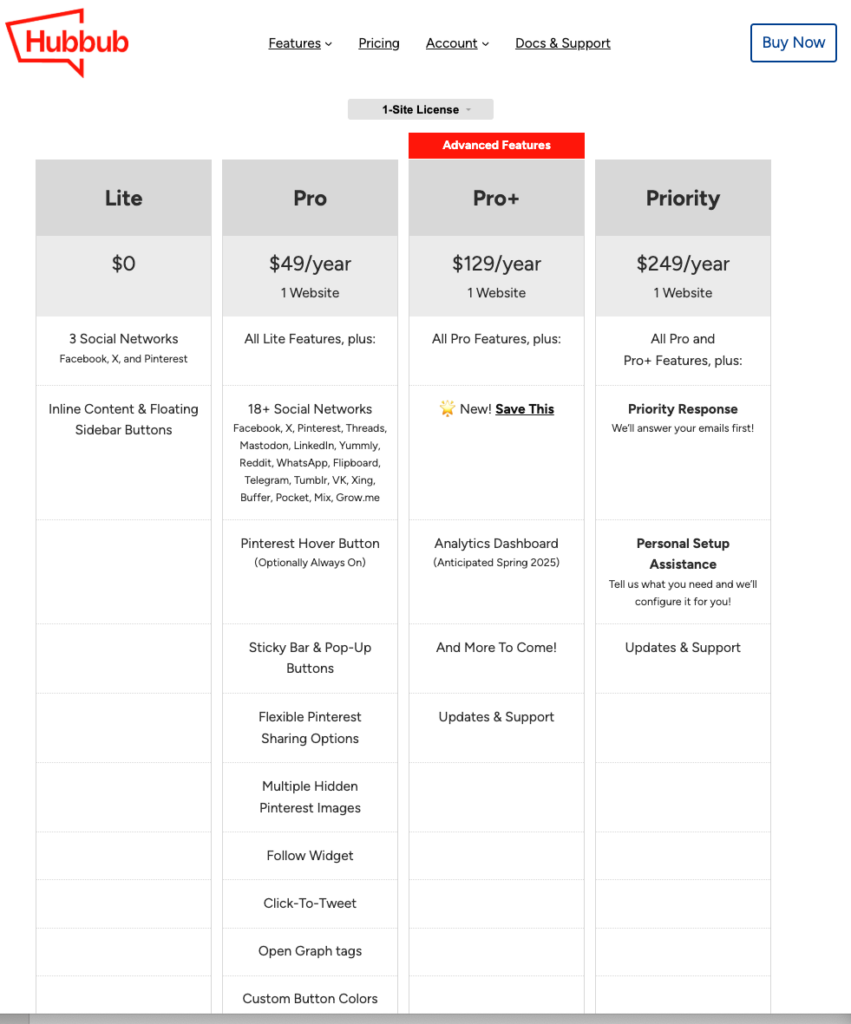
Hubbub was formerly Social Pug & Grow by Mediavine. For a 1 site license at $49 per year this is also an affordable price for what they offer. I haven’t used this plugin in years so I don’t know how it behaves anymore on your site once installed.
Final thoughts on Pinterest social sharing plugins
It really all comes down to being able to dictate which images are pinned, and what copy go with those images, once shared from your site. I love that you can opt out of hover pins on the plugin I use and you can add more than one image to the buttons. This is definitely something I would suggest anyone do if they are really trying to optimize their website for Pinterest. I feel it’s the best choice to encourage your audience to share to social media the right way, especially with your pin images.
These plugins are obviously only for WordPress so you may want to look up your specific site builder + Pinterest sharing buttons on Google to see what you can use.
For more Pinterest strategy and support be sure to check out Pin Profit Academy. There’s so much more to implementing a great content and Pinterest marketing strategy for your small business. Come inside for all the systems, templates, and coaching you need to support more traffic and sales to your products and services.

Pin Profit Academy
Marketing can be difficult and trying to figure it out on your own, especially with Pinterest, can be overwhelming.
I will show you how to double your traffic and sales without spending another minute on social media!
PPA is the only comprehensive membership program & community for creating, marketing & selling your products & services using Pinterest.
Pin it for later


Heather Farris went to school for accounting and worked for years in banking and finance. After finding all of that entirely too boring she started her first blog in her basement in August of 2016. She has started 3 blogs in the marketing, motherhood and travel niches and used Pinterest to grow them all. She quickly became the go-to Pinterest strategist in her peer circles and has been implementing strategies, driving traffic and sales through organic and paid tactics for her clients. On this blog and her YouTube channel, as a renowned Pinterest marketing expert, she educates the public about clear and transparent marketing strategies to help them to grow on Pinterest and in other places online. She created Pin Profit Academy and helps small business owners just like you to master their Pinterest marketing strategy. Heather is now a Pinterest Educator, one of the very few sponsored by Pinterest.










thank you for sharing! I found you from a Google search and just installed Social Warfare. Appreciate your thorough review!