Create a Pinterest Marketing Plan in 5 Easy Steps
Have you ever wondered what you need to pin or how to create a pinterest marketing plan? Whether you are confused about using Pinterest Trends or just understanding how to choose what to make pins for, I’ve got you covered.
In this blog post, I will walk you through exactly how to create a pin plan for your business for the next 30 to 90 days. I will take you through the exact steps that I take all of my clients’ strategies through. This is what I teach inside my Pin Profit Academy, where I am educating our students on Pinterest.
Where to start with your Pinterest marketing plan
Creating your Pinterest marketing plan starts with a little bit of brainstorming initially. Ask yourself a few questions:
- What content am I trying to create?
- What goals am I trying to achieve in the next 30 to 90 days?
- Are there launches coming up that I need to pencil into the calendar and for which you need to create content?
I also want you to cross-reference the events happening in your business with Pinterest Trends. Pinterest Trends is a tool that allows you to see when content searches are fluctuating up and down. It’s just like Google Trends, except on Pinterest. I want you to do a bit of brainstorming and start thinking about the content you will create in the next 30 to 90 days.
RELATED: How to use Pinterest Trends with the New Updates
Step 1: Create your content library
To create your pin plan, we will start with actually creating a content library. Most people fail to do this. They make one piece of content, promote it one time, and then it’s gone. They never think about it again, or only work through content once. The worst thing you can do in your business is spending a lot of time creating a piece of content that never gets love ever again.
I want you to build a content library for yourself. There are two ways to go about this:
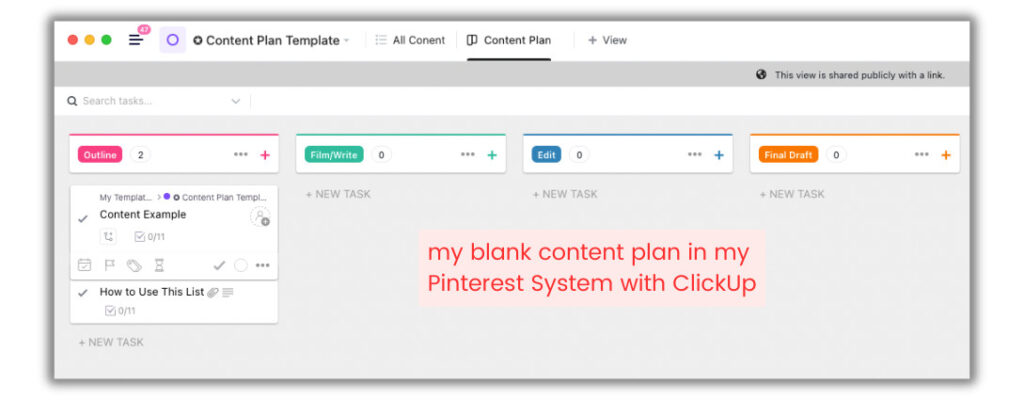
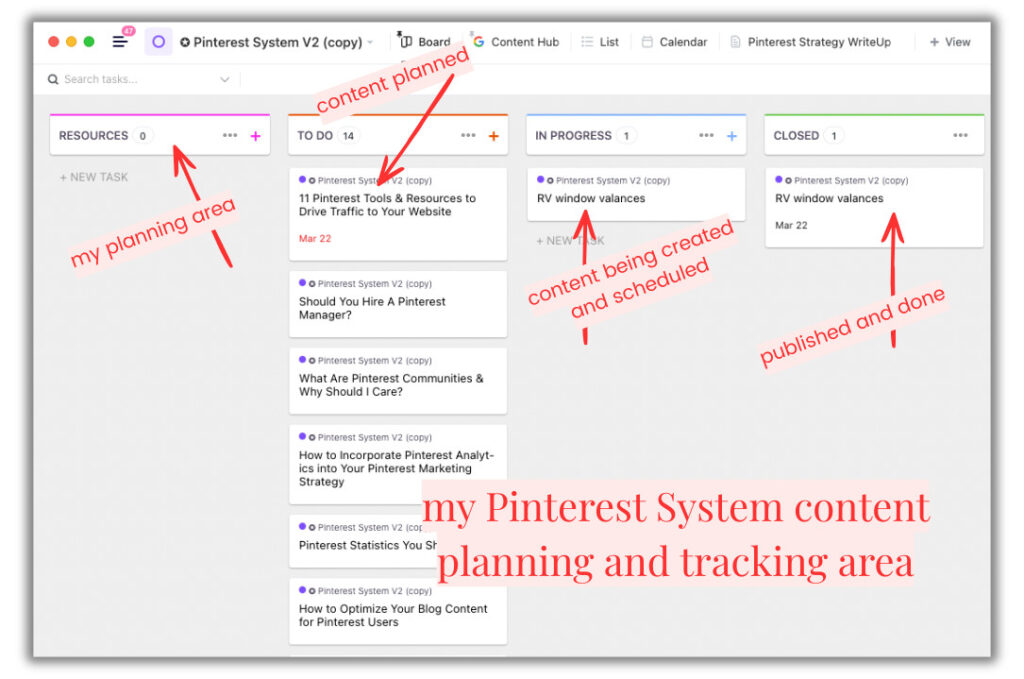
- You can create it into ClickUp
- You can use a spreadsheet
- You can modify my Pinterest System template
Spreadsheets are generally easier to use in the beginning. You are not using any crazy formulas. Or if you’re wanting something tried an true, already built, you can use my Pinterest System built in sheets and lists within Clickup.
You can grab it and use it fresh from the start. If you want to get started with your own, you can export your content from your website. Or do the dreaded long version and copy-paste it into a spreadsheet. Use any system that works for you to easily access, organize, and track your content links, images, products, and details.
When everything is in one place, when certain seasons or promotional periods come around, you can go back and use what youv’e got. This is the easiest way for you to create a content plan because you can choose from this library of content and start creating pins for it quickly.
RELATED: How to Manage Your Pinterest Strategy in ClickUp
Step 2: Create your content plan for the month or quarter
The next step is to create a content plan for the next one to three months. What content should be created for your business to get to the goals you want to achieve?
If you are launching a product in the next three months, you probably need to create awareness content that relates to that product. Consider the questions people will have and search to find your product. So, I would consider that and add that to my content plan.
- Check out the yearly Pinterest Predicts content on the rise for the entire year to see if your topic fits.
- Consider how you can adapt your content to every holiday or season and if that works for your customer.
- Answer all of the common questions your target audience often asks.
- Research all those topics and get the best keywords to apply for that content and your pins.
- Create a keyword bank inside your plan to use as you create new content and pins.
RELATED: How to Increase Pinterest Pin Clicks With a Strong Keyword Strategy
Step 3: Review all of your analytics
The next step is for people who are a bit further along in their marketing journey, and if you have Google Analytics installed on your website. If you do not have Google Analytics installed on your website and are not tracking your data, you need to do that right now. You need at least 90 days of data before reviewing anything, so if you’re brand new, come back after three months.
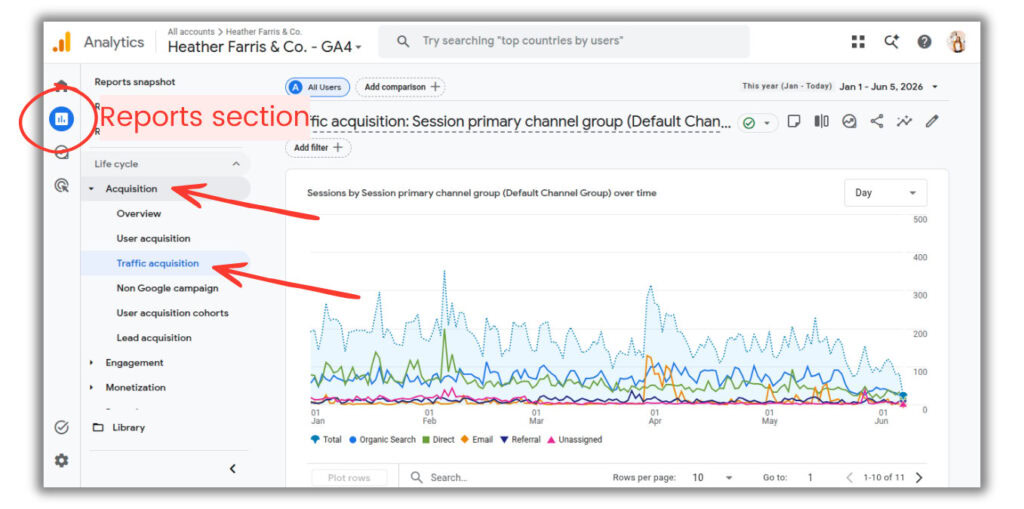
Skip right past installing the old-fashioned UA tag and go ahead and get GA4 installed. It was revamped a few years ago, so just use Google Analytics 4 right now. It’s really easy to get lost in your data, and it’s not very easy to find what you want to see. Here’s what to do:
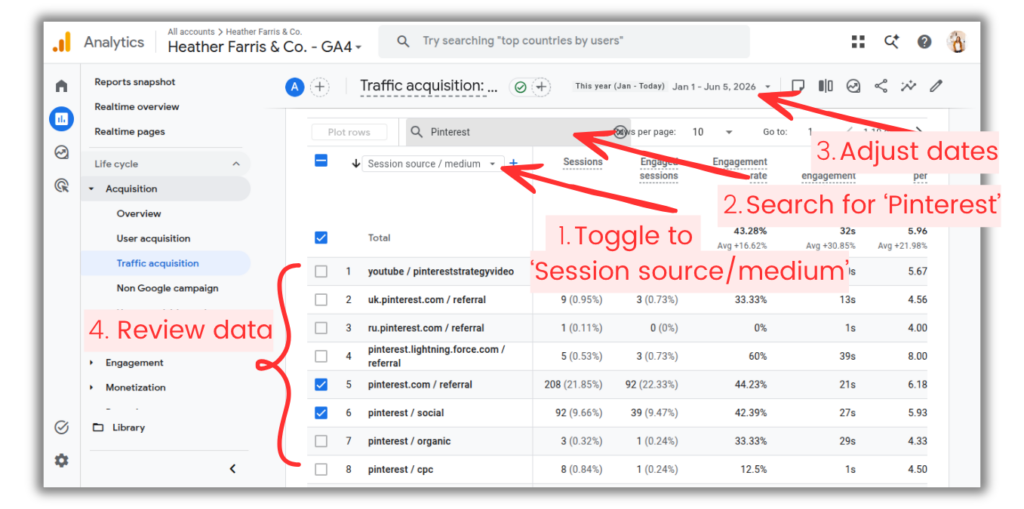
- In your dashboard, go to Reports > Acquisition > Traffic acquisition.
- Scroll down into the data table below the graph.
- Above the first column header, toggle the drop down to ‘Session source/medium’.
- In the search bar at the top of the table, search for ‘Pinterest’.
- Adjust the time frame dates for your data as desired at the very top of the screen.
RELATED: Pinterest Analytics: A Simple Guide to Read & Analyze Your Data
Time frames you want to examine in your data
Here’s what I suggest you look at for your traffic data. Change the date frame to the same time last year on that screen. So if you are looking to create a pin plan for the upcoming April, you will look at April of the previous year. If you want to create a Pinterest marketing plan for the holiday season like October to December, you’re going to look at that entire range last year.
I suggest that you even back that up by 90 days. So going with a plan for May, you could look at February to May. Because Pinterest starts circulating pins in advance, if you’re waiting to distribute content right at the peak of traffic times, you’ve already missed the curve. Users are planning months in advance too.
With seasons, we have the same user behavior. When spring happens, people are looking for gardening tips. When summer happens, people are looking for swimming and outdoor activities. Those industry trends will remain, in addition to new trends that have peak times too.

The Pinterest System
Speed up your client management processes and personal Pinterest marketing strategy with every content workflow and tracking system you need.
Track and manage your content, links, data analytics, keyword research and more! No more wasted time in your product or service business because you’ll have everything you need.
Whatever content was popular on your site last year around this time will be popular again, and you want to create pins for it again. Never discredit old content or topics that did well on your website, Pinterest, and social channels across bigger time frames. This isn’t Facebook where a post can last 3 hours, and an Instagram reel is good for a few days.
This is long term, organic distribution that can live for years. So developing a Pinterest marketing plan that supports this is important. Think long term, think farther back and farther ahead.
RELATED: Pinterest Analytics: What to Do With Your Pinterest Data
Step 4: Validate your content against Pinterest trends
The next step is actually taking what you find in your analytics and cross-referencing that with Pinterest Trends. That way, you can see the ups and downs, but you can also see what other searches people are looking for related to that topic.
Pinterest Trends will actually give you related searches linked to what you put in. So if you search for ‘backyard patio,’ they are probably going to give you:
- small backyard patio
- small landscaping patio
- patio ideas
- backyard landscaping ideas
So you can see what other people are searching for related to that main topic and see if you need to switch your verbiage a little bit. A little tweak in your keywords, or timing for when you publish your pins, can make a big difference in your long term traffic and riding that wave.
RELATED: Pinterest Trends: How to Use the New Pinterest Keyword Tool
Step 5: Pull your final pin plan together
Once we have our content library and content plan with topics for blogs and pins, and you’ve pulled our analytics in, you will start to pull in the important pieces of content into your action plan. Into this is what I need to create a pins list. And that is where you are going to apply more keyword research too.
Bringing all these things together, keywords, topic, and timing, you are going to make a Pinterest image and then schedule it.
Now I create pin plans on a week-by-week basis. One of the assistants on my team creates pin plans for an entire month. We actually have to make a pin plan for one of our clients 60 days in advance. So this will vary, business to business, person to person. Build it out how you flow well, but always be thinking ahead. If you’re playing catch up, you need to shift forward a few months.
However, I would suggest creating a minimum of a seven-day pin plan at a time, just so creating in bulk works in your favor to save time. So create a week at a time, and maybe you do four weeks, but you have each week broken out. That way, you can visually see what you need to create content for. It is a lot less overwhelming when it comes to creating the pins for that piece of content.
You don’t have this huge list for which you need to create pins. You just have a smaller list. Create pins for that smaller list, and it’s a big win. Get them scheduled and let them go out while you start on the next list.
RELATED: How To Use Canva Bulk Create With ChatGPT To Speed Up Your Pin Designs
Final thoughts on how to create a Pinterest marketing plan
If you want to snag any of the templates I have shown in this post for ClickUp or the spreadsheet, you can go to PinProfitAcademy.com. They are a part of my full Pin Profit Academy membership. When you join, you get the ClickUp resources and the Pinterest System, plus many, many more workflows and courses to cover everything. You can come and go as you please.
So that’s all the information you need for creating a Pinterest marketing plan. It doesn’t seem so hard, right? We are looking at our content plan, we are looking at our content library, we are looking at our analytics, and we are pulling from these things to create pins for. No more guessing. Happy pinning!

Pin Profit Academy
Marketing can be difficult and trying to figure it out on your own, especially with Pinterest, can be overwhelming.
I will show you how to double your traffic and sales without spending another minute on social media!
PPA is the only comprehensive membership program & community for creating, marketing & selling your products & services using Pinterest.
Pin it for later


Heather Farris went to school for accounting and worked for years in banking and finance. After finding all of that entirely too boring she started her first blog in her basement in August of 2016. She has started 3 blogs in the marketing, motherhood and travel niches and used Pinterest to grow them all. She quickly became the go-to Pinterest strategist in her peer circles and has been implementing strategies, driving traffic and sales through organic and paid tactics for her clients. On this blog and her YouTube channel, as a renowned Pinterest marketing expert, she educates the public about clear and transparent marketing strategies to help them to grow on Pinterest and in other places online. She created Pin Profit Academy and helps small business owners just like you to master their Pinterest marketing strategy. Heather is now a Pinterest Educator, one of the very few sponsored by Pinterest.