7 Things Missing in Your Pinterest Content Strategy
When you are crafting a Pinterest content strategy you may quickly become overwhelmed by all of the things you need to do to just get a pin published. Are you doing it right? What technical things are you forgetting?
Have no fear! I’m going to give you a list of 7 things you need in your strategy, as well as a handful you don’t. This is one of my favorite no fluff kinds of posts that will be quick and to the point because I know you’re busy. Let’s dive in!
What to ditch in your Pinterest content strategy
Here are a few things so-called experts may still be pushing as legit Pinterest content strategy tactics. Make sure you’re not doing these things often because they’re not vital to healthy growth on the platform.
Manual pinning
Pinterest has said that manual pinning isn’t necessary. There have been experts out there that say manual pinning is the only way to do it. So marketers would spend all their scroll time pinning on their phones.
If you are on the platform searching for recipes, baby ideas, business branding tips, then go ahead and pin them to your relevant boards. There is no harm in doing so, but it’s not necessary for your business strategy. Scheduling your pins entirely won’t affect your distribution or engagement on Pinterest.
RELATED: How to Schedule Your Pins for Free on Pinterest
Deleting pins
There are more experts out there that say to delete pins to “clean up” boards and appearance. Yet again, Pinterest has said they don’t believe in doing this. Sometimes the ugliest pins will pick up steam and send you a boatload of traffic.
Stop deleting pins. If you hate them enough, move them off your “best of board” to another more relevant board. If you’ve got old pins entirely off brand, you can just move them to a secret or archived board.
Use your pin stats from your analytics data to tell you which pins are performing better than others, and shift your pin style to the pins that are doing well.
RELATED: Pinterest Analytics: What to Do With Your Pinterest Data
7 Things missing in your Pinterest content strategy
Your Pinterest content strategy should be cohesive. If you need to create a checklist that you check off tasks on each time you create a new post then do it. Having a process or system already built to support your content creation and management is great, like my Pinterest System, I highly recommend that too.

The Pinterest System
Speed up your client management processes and personal Pinterest marketing strategy with every content workflow and tracking system you need.
Track and manage your content, links, data analytics, keyword research and more! No more wasted time in your product or service business because you’ll have everything you need.
So let’s cover exactly what you don’t want to miss with your Pinterest content strategy. We’re going to discuss:
- Pinterest SEO, or keyword optimization
- Pinning to most relevant boards only
- Having multiple boards around relevant topics
- New pins for old content
- Using Pinterest trends correctly
- Importance of video pins
- Utilizing your analytics data
Let’s touch on each of these, if you’re not doing one, what exactly to be doing with each and how. No matter what tools you’re using already.
Pinterest SEO
You may think you’re using Pinterest SEO (researched keywords) correctly, but you could probably do it better. Keyword data is always changing and needs to be done regularly, every time you create new content, review current content, and optimize old or lesser performing content.
The data and sources for Pinterest SEO is different than Google SEO. Similar idea, but different platforms and data sets. Some people mistakenly apply Google keywords to Pinterest content, which isn’t altogether bad, but it’s not optimized either.
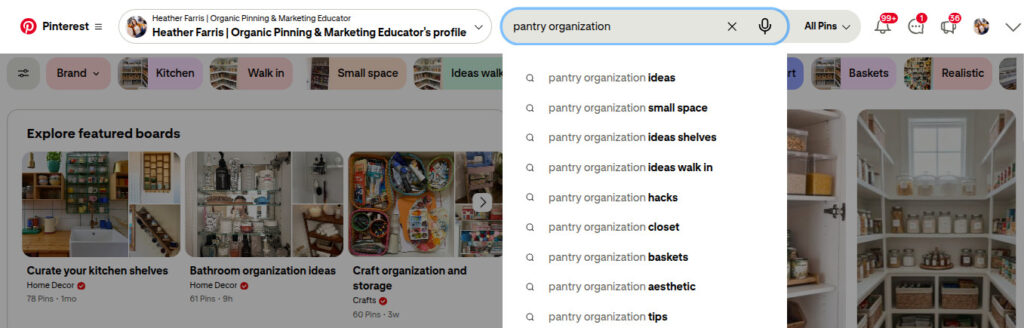
Do your keyword research directly on Pinterest. I also try to find keywords that are what I call parallel. This means keywords that are related but not directly. Pinterest is great at serving up your content for suggested parallel or other relevant content.
For example, I am searching for keywords for pantry organization. I will also search for words related to creative kitchen storage, kitchen storage containers, kitchen label ideas or even kitchen essentials. Just start typing into the Pinterest search bar and let it tell you what to use for your Pinterest SEO.
RELATED: Pinterest SEO: What Are Your Customers Searching For on Pinterest?
Pinning to your most relevant board
A lot of people are still using old habits like having a “Best of (your brand name)” board where all of your content is pinned there, or your top performing pins get copied there. Stop pinning to your “Best of” board first. Putting all of your content topics on a single board, that’s not optimization at all.
When you create a pin, always pin it to the most topic relevant board first, sometimes only. Multiple boards with similar topics don’t need copies of all your pins either. Boards have SEO as well as the individual pins. But if they don’t line up together, Pinterest can’t categorize and serve up your pins appropriately.
RELATED: The Ultimate Guide to Create Your Pinterest Board Strategy
Creating multiple boards around a relevant topic
There is nothing wrong with creating multiple boards around the same topic. This will only increase your Pinterest SEO opportunities as you create more content. I prefer to have at least 3 boards if not 5 around a similar topic. They don’t need to be exactly the same either.
Think outside of the box here and do your keyword research. For example, for one food blogging client I have, I created a minimum of 5 boards she can pin to and some of them overlap. If I were pinning a chicken casserole recipe for her I would pin them to a few of the following boards.
- Dinner ideas
- Chicken recipes
- Quick family dinner
- Casserole Ideas
- Oven baked recipes
I wouldn’t just have a single board for her called “chicken recipes” or “casserole recipes”. There’s variety and the same pin isn’t everywhere either.
RELATED: Pinterest Board Covers for Better Conversions on Your Profile
Creating new pins for old content
A lot of people completely neglect to do this. I think it’s because once a post is out, there they completely forget about it. But this is one of the biggest opportunities, aside from Pinterest SEO, to get eyeballs on your website. I like to create a minimum of 4 new pins per week for existing content. This ensures we are getting new content out and leaves room for both old and new blog posts or products.
I will go into Google Analytics and find the top trafficked pins and blog posts, and create new versions from them. I will also create new pins for paid products and opt-ins.All new pins get new keyworded descriptions and added to the queue just like any other pin, regardless if the URL content is old or new.
RELATED: How to Optimize Your Blog Content for Pinterest Users
Using Pinterest trends correctly
If you haven’t noticed, you may see a drop in traffic when a season or holiday trend hits. For instance, around the 4th of July everything switches to that holiday. There is everything red, white and blue and you can’t get away from it for a while. So what do you do? You pin with the Pinterest trends.
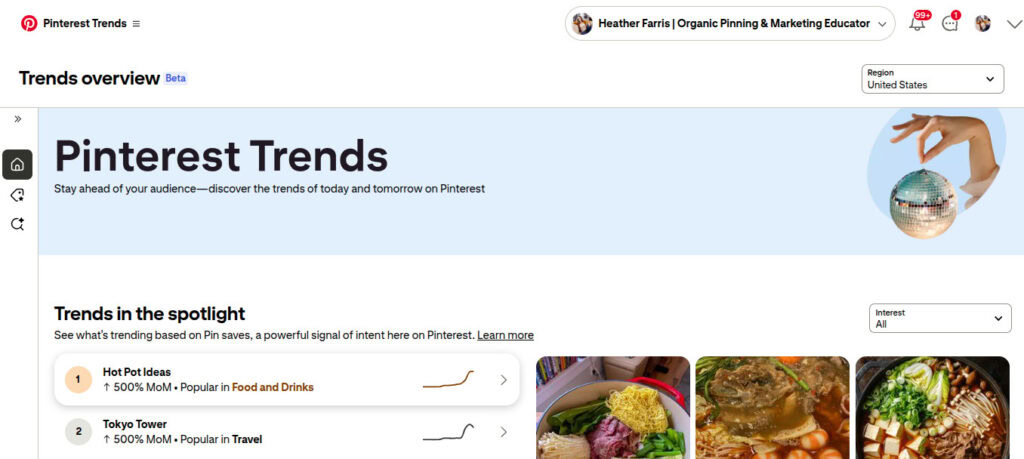
If you are a home decor blogger, then you are pinning holiday decor ideas. If you are a parenting blogger, you are pinning holiday-related family activities. Get my drift? Go with the trends or get left out. You need to get on the trends bandwagon at least 45 days in advance.
RELATED: How to use Pinterest Trends with the New Updates
Using video pins
Video pins capture and hold audience attention, in general, longer than static pins. We’re seeing better stats and overall engagement with video pins. If you’re not making them, work them into your pins creation. Don’t make all of your pins videos, but a generous amount is good.
You can repurpose your Instagram reels or YouTube shorts into Pinterest video pins. There are a variety of ways to make video pins that don’t require you to do major filmography or editing, even using pins and imagery you’ve already created.
RELATED: How to Make Pinterest Video Pins in 3 Easy Ways (No Filming or AI)
Utilizing your analytics data
Lastly, but certainly, not least, make sure you’re reading your data. You’ve put all of this time and effort into a Pinterest content strategy, so understanding what’s contributing to your ROI is essential. This is something you need to do each month. Spend an hour or two compiling your data and looking at what is working and not.
Pinterest does a great job at presenting your data in a very simple way, and there isn’t miles of ways to confuse you with how it’s organized like Google’s data. Start tracking, be just as consistent with reviewing your analytics as creating your pins.
RELATED: Pinterest Analytics: A Simple Guide to Read & Analyze Your Data
Final thoughts on what’s missing in your Pinterest content strategy
That’s it! Seven things that may be missing from your Pinterest content strategy. If you’re missing a few things, don’t feel like you have to do these all at once. Start slow and add things until you have a complete system built that maintains what you need for a great Pinterest content strategy.
If you’re ready to take your Pinterest strategy to the next level, jump into Pin Profit Academy. Inside, all of the processes, tools, and systems are built and ready for you to implement, no matter your experience. Plus enjoy direct access to me with getting your questions answered every week inside our community. Happy pinning!

Pin Profit Academy
Marketing can be difficult and trying to figure it out on your own, especially with Pinterest, can be overwhelming.
I will show you how to double your traffic and sales without spending another minute on social media!
PPA is the only comprehensive membership program & community for creating, marketing & selling your products & services using Pinterest.
Pin it for later


Heather Farris went to school for accounting and worked for years in banking and finance. After finding all of that entirely too boring she started her first blog in her basement in August of 2016. She has started 3 blogs in the marketing, motherhood and travel niches and used Pinterest to grow them all. She quickly became the go-to Pinterest strategist in her peer circles and has been implementing strategies, driving traffic and sales through organic and paid tactics for her clients. On this blog and her YouTube channel, as a renowned Pinterest marketing expert, she educates the public about clear and transparent marketing strategies to help them to grow on Pinterest and in other places online. She created Pin Profit Academy and helps small business owners just like you to master their Pinterest marketing strategy. Heather is now a Pinterest Educator, one of the very few sponsored by Pinterest.